Native Android features
Task guides: Firebase push, streaming uploads and maps with continuous location.
Motion and environment: sensors, units and Previewer simulation.
NFC tags — new in 1.9.0
nfc reads NDEF text and links, reports tag IDs and technology, and arms
one-shot text/URI writes for the next contact. It uses foreground reader mode
with lifecycle cleanup. No additional Android dependency or Python runtime is
added to the output; apps without NFC calls receive no NFC code or permission.
The Previewer has an in-frame, explicitly labelled NFC simulator for writable, read-only, small, empty and non-NDEF tags. A simulated success is not proof of physical radio or tag compatibility. See the NFC guide for complete code, error reasons, safety and unsupported features.
Contacts — new in 1.9.0
contacts.pick() selects one phone/email without reading the whole address
book. list() and get() request read access when called, then query on a
background executor. create() and edit() open the system contact editor;
settings() opens this app's settings. All callbacks take (ok, value).
There is no direct delete or WRITE_CONTACTS. The editor decides save/cancel;
its return callback does not prove a write. The desktop simulator uses only
fictional contacts. See complete code, permissions and privacy.
No contacts helper is emitted for apps that do not use the API.
Permissions
Declare permissions before running the app:
Request dangerous permissions at runtime:
def permission_result(granted):
    if granted:
        toast("Permission granted")
    else:
        toast("Permission denied")

permissions.request(
    "android.permission.CAMERA",
    on_response=permission_result,
)
Only request permissions when a user action needs them, and explain the reason in the interface.
Notifications and sharing
notify("Download complete", "Midnight Drive is available offline")
share("Listen to Midnight Drive", title="Share track")
clipboard.copy("https://example.com/track/42")
notify creates a system notification. toast is for brief in-app feedback. snackbar is useful when the message belongs to the current screen and may include an action.
Camera and gallery
def image_selected(success, path):
    if success:
        avatar.set_value(path)

camera.capture(on_result=image_selected)
gallery.pick(on_result=image_selected)
The Previewer uses a file picker to simulate the flow. Android opens the native camera or content picker.
camera and gallery are image-only. For documents, archives, audio or anything else use files.pick, or upload_button to pick and send in one step:
def file_chosen(success, path, name, size, mime):
    if success:
        chosen.set_value(name + " - " + size + " bytes")

files.pick(on_result=file_chosen, types=["pdf", "zip"])
See Streaming multipart uploads.
Biometrics
from apkpy_lib import Screen, biometrics, button, label, on_click_navigate, run, toast

home = Screen(id="home")
vault = Screen(id="vault")

label("Your notes are locked", id="t", screen=home)
label("Here they are", id="v", screen=vault)


def unlocked(ok, reason):
    if ok:
        on_click_navigate(vault)
    else:
        toast(reason)


def ask():
    biometrics.unlock(
        title="Unlock the vault",
        subtitle="Use your fingerprint",
        cancel_text="Use password",
        on_result=unlocked,
    )


button("UNLOCK", id="go", icon="lock", screen=home, command=ask)
run(start_screen=home)
USE_BIOMETRIC is declared for you, and androidx.biometric is added to the
Gradle build only for an app that asks for the prompt. An app that never
mentions it generates the project it generated before.
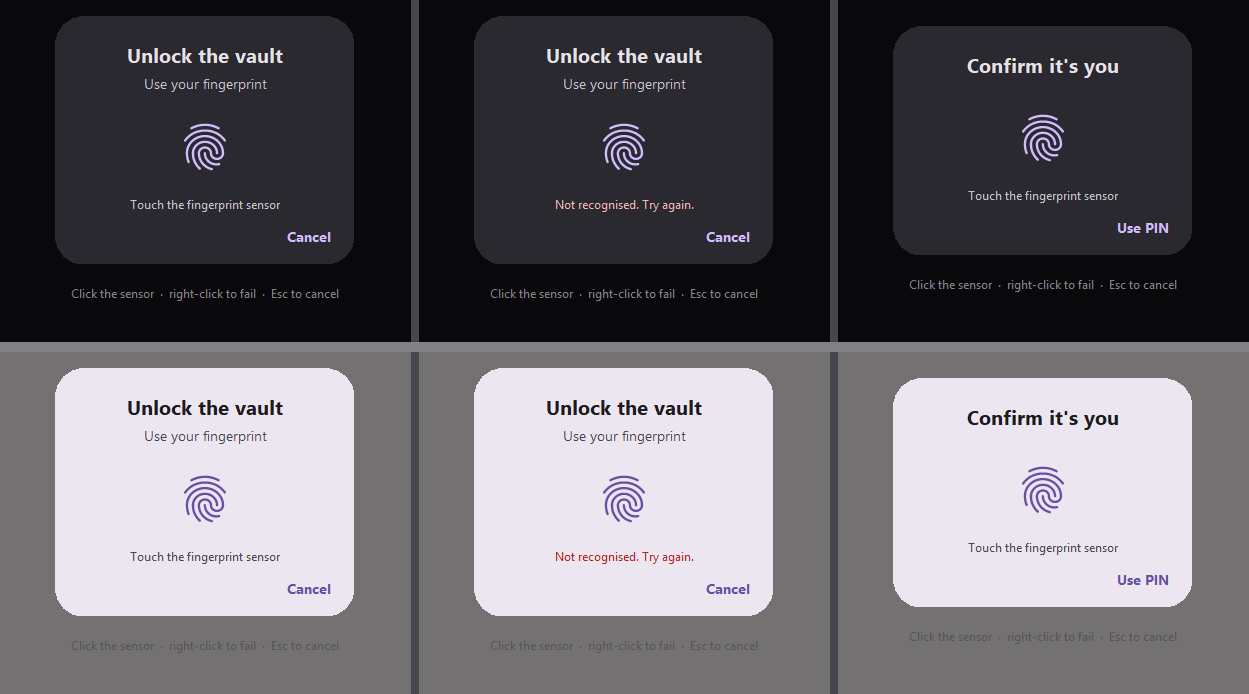
Android draws this dialog
BiometricPrompt is a system surface. An app supplies the title, the
subtitle and the words on the cancel button, and the platform draws everything
else — the shape, the colours, the sensor, the typeface. That is why those
three strings are the whole API: there is nothing else to give it.
It also means a typeface declared with font() does not apply here. The
prompt uses the system font on the phone, so the Previewer's replica does too.
The seven reasons
on_result receives (success, reason). reason is "ok" on success, and
otherwise one of:
| Reason | What happened | What an app usually does |
|---|---|---|
cancelled |
Dismissed, or the cancel button was pressed | Nothing. They chose to stop |
no_hardware |
The device has no biometric sensor at all | Hide the unlock button entirely |
not_enrolled |
A sensor, but no finger or face registered | Offer a password, and say why |
unavailable |
The sensor cannot be used right now | Offer a password; suggest retrying |
lockout |
Too many failed attempts; temporarily disabled | Offer a password. The sensor is out |
failed |
It ended without success for another reason | Offer a password |
It is never an empty string, so an app always has something to say. Both runtimes resolve these words from the same table, so neither can report one the other does not know.
def unlocked(ok, reason):
    if ok:
        on_click_navigate(vault)
    elif reason == "cancelled":
        pass                                  # they chose to stop
    elif reason == "no_hardware":
        on_click_navigate(password_screen)    # this phone will never do it
    else:
        toast("Could not confirm it was you")
        on_click_navigate(password_screen)
The status is checked before the dialog is built, so a phone with no sensor
gets no_hardware rather than a prompt that cannot succeed.
A scan that does not match is not a result
Android keeps the prompt open and lets the person try again, so the
callback does not fire. It fires when the check ends — confirmed,
cancelled, or impossible. Both runtimes behave this way, which is why
there is no on_failure.
Falling back to the PIN
allow_pin=True lets the person use the device PIN, pattern or password
instead, and a correct one succeeds exactly like a matching finger.
The cancel button disappears in that mode, and cancel_text is ignored.
That is not a simplification: Android's PromptInfo.Builder throws if a
negative button and DEVICE_CREDENTIAL are both set, because the system draws
its own way out. The Previewer drops it too, so what you design is what ships.
In the Previewer
The desktop has no sensor, so the Previewer draws a replica of the dialog from the same three strings and lets you drive it by hand:
| Action | What it does |
|---|---|
| Click the fingerprint | A scan that matches — (True, "ok") |
| Right-click the fingerprint | A scan that does not. The prompt stays open, the way it does on the phone |
Cancel, Esc, or a click outside |
(False, "cancelled") |
Use PIN (when allow_pin=True) |
Stands in for the system credential sheet, and succeeds |
The one-line hint is drawn on the scrim, outside the card, so the card itself stays a copy of what the phone shows.
What the two runtimes guarantee is the same words, the same shape, the same result and the same timing — not the same pixels, because the phone's dialog is drawn by the system and cannot be styled by anyone. See Previewer versus Android.
The icon catalogue also gained fingerprint, lock and lock_open (with
biometrics, touch_id and unlock as aliases) for the button that opens the
prompt.
Bluetooth
Talking to hardware: an Arduino, an ESP32, a micro:bit, a thermal printer, a scale. Lines of text out, lines of text back.
def incoming(ok, line):
    if ok:
        reading.set_value(line)
    else:
        toast("The link dropped")

def linked(ok, reason):
    if ok:
        bluetooth.send("LED ON")
    else:
        toast(reason)

bluetooth.connect(address, on_result=linked, on_line=incoming)
Two radios, four verbs each
Android has two Bluetooth stacks and treats them as different things, so ApkPy does too. Both speak the same four verbs and the same result contract, so an app that switches between them changes two lines.
bluetooth |
ble |
|
|---|---|---|
| What it is | Classic serial (SPP) | Low Energy |
| Typical hardware | HC-05/HC-06 modules, receipt printers, scales | ESP32, micro:bit, sensors, heart-rate straps |
| Finding devices | devices() lists paired ones |
scan() looks for advertising ones |
| Pairing | in system Settings, first | not needed |
bluetooth.devices(on_result=found)                  # paired
ble.scan(on_result=found, seconds=8)                # advertising

bluetooth.connect(address, on_result=linked, on_line=incoming)
ble.connect(address, on_result=linked, on_line=incoming)

bluetooth.send("LED ON")
bluetooth.disconnect()
Both report devices as JSON that set_items reads directly:
def found(ok, devices):
    if ok:
        device_list.set_items(devices, title="name", subtitle="address")
    else:
        toast(devices)          # the reason, not a list
on_line carries the data and its loss
It is called (True, text) for every line the device sends, and once as
(False, reason) when the link drops. One callback for both, so an app cannot
forget to handle the disconnect.
A device that never sends a line ending will not produce a line: reading is line-oriented on both runtimes.
A disconnect you asked for is not a loss. Calling disconnect(), or
connecting somewhere else, does not fire on_line with "lost" -- only a link
that ended on its own does. Without that distinction, changing device would
have told the new screen its brand new link had already died.
A dropped Low Energy link is closed properly. Android allows an app only so
many GATT clients at once, so a link that falls over releases its own rather
than being left for the next connect() to tidy up.
Why classic does not scan
devices() lists paired devices and never runs a discovery. An RFCOMM socket
needs a bonded device anyway -- pairing asks for a PIN, and that belongs to
system Settings -- so discovery would return things you cannot connect to.
It also skips ACCESS_FINE_LOCATION, which Android used to demand for a
Bluetooth scan. An app that only talks to a printer should never ask where its
user is. Classic Bluetooth in ApkPy declares no location permission at all.
BLE has no such choice: devices advertise instead of pairing, so it really does
scan. That grant is declared as narrowly as the platform allows -- capped at
API 30, with neverForLocation on the modern scan permission -- so a phone on
Android 12 or later never sees a location request either.
Permissions and the radio are asked for, not assumed
Both are runtime decisions on modern Android, and both are handled for you:
- if the permission is missing, the app asks, and resumes what you called once the person answers;
- if Bluetooth is switched off, the app offers to turn it on through Android's own prompt;
- either refusal is remembered, so a second tap does not reopen the dialog --
the call simply reports
deniedoroff.
The reasons
on_result receives (success, value). On failure value is one of these
words, never an empty string:
| Reason | What happened |
|---|---|
off |
Bluetooth is switched off, and the person declined to turn it on |
unsupported |
This phone has no such radio |
denied |
The permission was refused |
not_paired |
Classic: no paired device at that address |
not_found |
Low Energy: nothing answered at that address |
unreachable |
Paired or advertising, but it did not accept the connection |
no_service |
Low Energy: connected, but it does not expose that service |
not_connected |
Nothing is connected, so there was nothing to send |
lost |
The connection dropped |
failed |
It did not work, for another reason |
Both runtimes resolve these from one table, and the generated Java's switch
is emitted from that table, so they cannot drift.
Line endings
send() appends a newline, because that is what a serial sketch reads to.
Hardware that wants something else says so:
terminator= |
Sends |
|---|---|
"newline" (default) |
\n |
"return" or "cr" |
\r |
"crlf" |
\r\n |
"none" |
nothing |
Sending the wrong ending -- or none -- is the usual reason a board never answers.
The link outlives the screen
A connection belongs to the app, not to the screen that opened it. Connect on one screen, navigate, and carry on talking:
# on the list screen
bluetooth.connect(address, on_result=linked, on_line=incoming)

# on the next screen, to receive lines there too
bluetooth.connect(address, on_result=arrived, on_line=incoming)
The second call finds the link already open, hands the lines to the new
screen's callback, and answers ok without touching the radio. So a screen
that wants to listen simply asks -- there is no separate "attach" step to
forget.
Sending needs no call at all: send() reaches whatever is connected.
Behind this, the socket lives in a generated ApkpyBluetooth class rather
than in an Activity. A field on a screen dies with it, and a static would
not help either -- every screen is a different class, so each would get its
own copy.
What a screen still owns
Only its callback. When a screen is destroyed it stops receiving lines,
and the link stays open for whoever asks next. It closes when you call
disconnect(), or when the app itself ends.
Low Energy without UUIDs
ble defaults to the Nordic UART Service, which is what an ESP32, a
micro:bit or an HM-10 exposes: one characteristic the phone writes to and one
it subscribes to, carrying lines of text. So the common case names nothing.
A device with its own profile names them, in 16-bit shorthand or in full:
On BLE, send() returning ok means accepted for sending, not delivered:
the protocol gives no end-to-end receipt. Writes are queued, so several sends
in a row are delivered in order rather than the second being refused.
In the Previewer
The desktop has no radio. The Previewer offers one device, openly named a
simulation, and a monitor docked at the bottom: what the app sends appears
in it, and what you type there arrives at on_line.
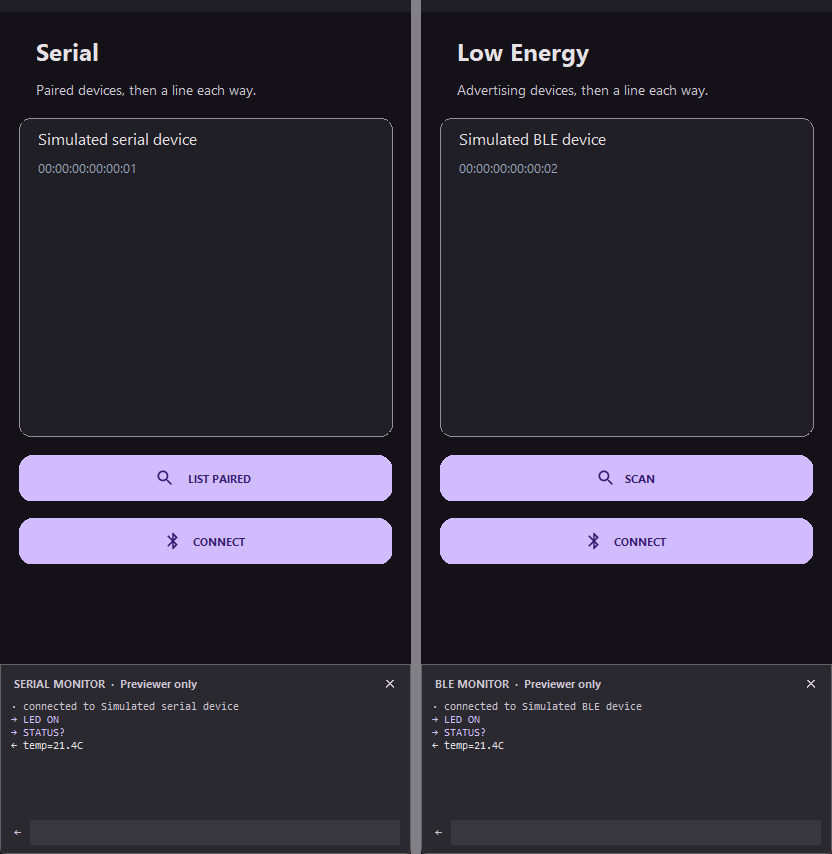
Connecting to any address other than the simulated one fails, exactly as it would on the phone -- a Previewer that connected to anything would hide the mistake until you had the cable in your hand.
What has been checked on a phone, and what has not
An Android emulator has no Bluetooth radio, so everything below the surface was exercised on a real device with a real peer -- a smartwatch -- rather than in the emulator.
Confirmed on a phone:
- the permission prompt appears, and a refusal reports
deniedrather than failing silently; - the "turn Bluetooth on" prompt appears when the radio is off;
- a scan finds real advertising devices, and the list reaches
set_items; - connecting to a real device establishes the link, discovers its services,
and reports
no_servicewhen it does not speak the one that was asked for; - the connect timeout does not fire on a device that answers;
- the failure words are the right ones:
not_connectedwith nothing open,not_pairedfor a classic address that was never bonded, andunreachableafter fifteen seconds for a Low Energy address that never answers.
Still unproven, because it needs a board that speaks back:
- lines actually arriving through
on_line, which on Low Energy depends on the CCCD write -- if that ever broke, a device would connect perfectly and simply never say anything; send()reaching a peer, and the terminator mattering to it;- the write queue under real timing;
- a live conversation surviving a navigation.
If something fails, the reason above tells you where it stopped -- which is the point of there being ten of them rather than one.
Not included
Binary data (it is line-oriented text), more than one device at a time, the
phone acting as the device rather than the client, pairing from inside the
app, and the wider GATT surface -- reading characteristics on demand, MTU
negotiation. ble covers the conversation, not the whole protocol. Speakers
and headsets are not here either: the system owns those.
In-app purchases
Selling something inside the app: a one-time unlock, a pack of coins, or a subscription.
def shown(ok, items):
    if ok:
        shop.set_items(items, title="title", subtitle="price")

def bought(ok, value):
    if ok:
        storage.set("pro", "yes")
    elif value == "owned":
        storage.set("pro", "yes")          # they had already paid
    elif value == "pending":
        toast("Payment started. Nothing is unlocked yet.")
    elif value != "cancelled":
        toast(value)

billing.prices(["pro_unlock", "coins_100"], on_result=shown)
billing.buy("pro_unlock", on_result=bought)
billing.buy("coins_100", consumable=True, on_result=bought)
Subscriptions use the same shape:
billing.prices(["monthly", "yearly"], kind="subscription", on_result=shown)
billing.subscribe("monthly", on_result=bought)
com.android.vending.BILLING is declared for you, and the Play Billing library
is added to the Gradle build only for an app that sells something.
The three-day rule, handled for you
Google refunds any purchase an app has not acknowledged within three days. The money goes back, the person keeps nothing, and nobody tells you until the support email arrives.
ApkPy acknowledges every completed purchase before it tells your callback it
succeeded -- so there is no call you can forget. consumable=True consumes it
instead, which settles the same clock and is what lets it be bought again.
That ordering matters: reporting success first and acknowledging afterwards would let an app unlock something that is about to be refunded.
Play can hand back more than one purchase in a single update -- a backlog, or a purchase that completed while the app was away. Your callback still fires once; the rest are settled quietly, so one tap never produces three "thank you" screens.
owned() settles too. A purchase that completes while the app is closed --
killed mid-payment, or backgrounded and forgotten -- never reaches the live
listener, and is only ever seen the next time purchases are listed. Anything
found unacknowledged there is acknowledged on the spot, which is the only
place that case can be caught.
pending is not a purchase
Cash and other slow methods finish later. Play reports the purchase as pending, and ApkPy passes that through as its own word rather than as success or as an error. Unlock nothing yet -- the payment may never clear.
Prices come from the store
prices() asks Play, which answers in the person's own currency, already
formatted for their locale, with the title and description you wrote in Play
Console. A price written into the app is wrong in most of the world.
For subscriptions the price is the first offer's first pricing phase -- the
same offer subscribe() launches, so what you show is what they pay.
Ownership, and why the token matters
Reports everything the account has bought, so a reinstall or a second phone
restores what was paid for. Each row carries id, token, order and time.
On-device ownership is a hint, not proof
A rooted phone can lie to this API and the app cannot tell. Anything worth
real money should be checked on your server against the Play Developer API
using the token from that row. That is why the token is in the payload
rather than hidden.
The reasons
| Reason | What happened |
|---|---|
cancelled |
They backed out of the sheet. Usually show nothing at all |
owned |
They already own it. Nothing was charged -- unlock it |
pending |
Payment started but has not cleared. Unlock nothing |
not_found |
No such product id, or the app is not on a track yet |
not_supported |
No Play Store on this device |
unavailable |
Play's billing service could not be reached |
network |
The network failed mid-purchase |
denied |
Play refused: unsigned build, app not on a track, or not a licensed tester |
not_owned |
Nothing to consume |
failed |
Something else |
owned and cancelled are the two that get mishandled most: neither is an
error, and showing "payment failed" for either is lying to a paying customer.
Testing this at all
Play billing cannot be exercised on an emulator, and the old static test products were removed in Billing Library 3. To see a single real purchase you need:
- a Play Console account;
- the app uploaded to a track -- internal testing is enough;
- the products created in Play Console with the same ids;
- your account added as a licensed tester, which makes purchases free.
Until then the Previewer is the only place the flow runs.
In the Previewer
The desktop has no Play Store, so the Previewer runs a make-believe shop:
it invents a price, shows a sheet that says plainly it is not real, and
remembers what was bought so owned() answers and a second buy() reports
owned.
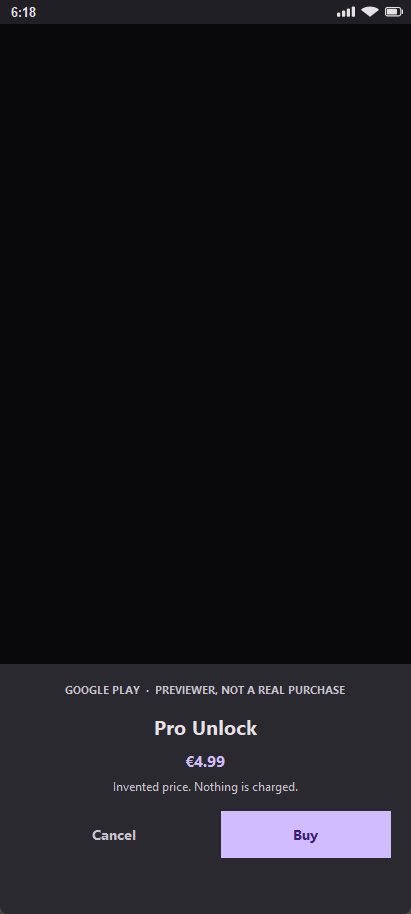
Nothing is charged and no account is touched. What it gives you is the shape of the flow -- the sheet, the cancel, the restore, the second purchase being refused. What it cannot tell you is whether your product ids are right.
Compiled and reviewed, never sold
Unlike the rest of this page, no part of this has been exercised against Play. It is verified to compile against Billing Library 7.1.1, to declare the right permission, to acknowledge before reporting, and to run in the Previewer -- and no further, because a real purchase needs a Play Console account and a published build. The first sale you make will be the first one anyone has made with it.
Not included
Price changes and proration when moving between subscription plans, multiple offers per subscription (the first is used), promo codes, and server-side verification itself -- ApkPy hands you the token; checking it is your backend's job.
Location
def location_result(success, latitude, longitude, city):
    if success:
        location_label.set_value(city + " · " + latitude + ", " + longitude)
    else:
        location_label.set_value("Location unavailable")

location.get_current(on_result=location_result)
Declare and request the appropriate location permission before reading the device position.
Talking to an API
https sends the request off the UI thread and hands the answer back on it,
so nothing you write here can freeze the screen. The INTERNET permission is
added to the manifest for you.
def answered(success, response):
    if success:
        reply.set_value(json_get(response, "content.0.text"))
    else:
        reply.set_value("That did not go through. " + response)


def ask():
    https.post(
        "https://api.example.com/v1/messages",
        data={
            "model": "some-model",
            "max_tokens": 1024,
            "messages": [{"role": "user", "content": question.get_value()}],
        },
        headers={"x-api-key": storage.get("api_key", "")},
        timeout=120,
        on_response=answered,
    )
Three things worth knowing:
A dict is JSON, and keeps its types. max_tokens arrives as the number
1024, not the string "1024" — an API that validates its input rejects the
second. Nested lists and objects survive too. And because the serialiser does
the writing, a quote or a newline in what the user typed is escaped properly
instead of breaking the body, which is what string concatenation would do.
timeout= is in seconds, and the default is 60. Most endpoints answer in
under a second, but anything that thinks before it replies does not. Raise it
rather than discovering the ceiling in the field.
The callback needs a name. on_response=answered compiles;
on_response=lambda ok, body: ... does not. The callback also cannot see
variables from the function that started the request — ApkPy reads your module
rather than running it, so a value set at call time does not exist for the
generated code. Hand it over through storage instead:
def ask():
    storage.set("pending_row", row_id)
    https.post(URL, data=body, on_response=answered)


def answered(success, response):
    thread.stream_item(storage.get("pending_row", ""), "message",
                       json_get(response, "content.0.text"))
About API keys
Anything inside an APK is readable by whoever installs it. Unzipping one takes about thirty seconds, and no amount of obfuscation changes that — the app has to be able to read the key to use it, so anyone holding the app can too.
There are two honest shapes:
- The user brings their own key, pasted into a settings screen and kept in
storage(which is encrypted at rest). Right for a personal app, a developer tool, or anything where the user already has an account. - Your server holds the key and the app talks to your server. Necessary the moment the app speaks on your account, because that is the only way the key never ships.
Background work
def sync_library():
    https.get(API_URL, on_response=save_library)

service.every(
    run=sync_library,
    minutes=15,
    id="library_sync",
    only_on_wifi=True,
    only_when_charging=True,
)

service.once(run=sync_library, after_minutes=5, id="initial_sync")
service.cancel(id="library_sync")
Android compiles scheduled work to WorkManager. The operating system controls the exact execution time, particularly for periodic jobs.
service.every is a schedule. When you instead need a queue — work that is
handed over once and must survive the app closing, the network dropping or a
reboot — declare a persistent job:
outbox = background_job(
    "outbox",
    run=deliver_message,
    requires_network=True,
    retry="exponential",
    unique=True,
)

outbox.enqueue({"text": message_input.get_value()})
outbox.observe(on_change=queue_changed, screen=home)
Read Background jobs and offline queue for constraints, retries, unique-work policies, cancellation and observable progress.
App inspection
apps.list(on_result=show_apps)
apps.permissions("com.example.app", on_result=show_permissions)
apps.extract("com.example.app", on_result=extracted)
apps.hash("com.example.app", on_result=hashed)
These APIs inspect packages available to the Android device and simulate results where possible in the Previewer.
Google Play package visibility
Broad package visibility, especially QUERY_ALL_PACKAGES, is restricted by Google Play policy. Use it only when the app's core purpose qualifies, and prefer targeted package queries where possible.
Native dialogs
alert("Saved", "Your settings were updated.")

confirm(
    "Delete playlist?",
    "This cannot be undone.",
    on_result=lambda accepted: delete_if_confirmed(accepted),
)
Use Overlays and content states for richer Material sheets, modals, menus, pickers and snackbars.
Languages
Text used to be written straight into each screen, so an app spoke exactly one language. Declare the words once and both runtimes read the same table:
from apkpy_lib import label, language, t, translations

translations({
    "en": {"title": "Warehouse", "scan": "Scan a code"},
    "pt": {"title": "Armazem",   "scan": "Ler um codigo"},
}, default="en")

label(t("title"), id="head", screen=home)
t("key") in a component becomes @string/apkpy_key in the layout, and each
language becomes its own res/values-<tag>/ folder. The phone then picks by
its own locale, with no code at all.
The default language is what the phone falls back to when it has no translation of its own, so every key has to exist in it. A key that only appears in another language is refused while you build, rather than becoming a missing-resource error against generated XML.
Switching while the app runs
language.set("pt")      # "pt", "en", "pt-BR"
language.get()          # the choice, or the device's own language
language.available()    # every language declared, default first
On the phone this is AppCompatDelegate.setApplicationLocales, which recreates
the screens the same way a theme change does. The choice is stored, because
AppCompat only remembers it from Android 13 up and an app that forgot the
language on every restart would be worse than one that never offered a switch.
Where t() cannot go
A translated word becomes a reference to a resource, and Android only
reads a reference when it is the whole value. label("Hello " + t("name"))
would draw the reference itself on screen, so it is refused. Put the whole
sentence in the table with its own key, or build the joined text inside a
function, where it is assembled while the app runs.
Crash reports
An app that stops on somebody else's phone tells nobody. This keeps the last crash where the next launch can read it:
from apkpy_lib import crash, https, lifecycle

def on_open():
    report = crash.last()
    if report:
        https.post("https://example.com/crashes",
                   json={"trace": report}, on_result=sent)
        crash.clear()

lifecycle(home, on_mount=on_open)
ApkPy does not choose a crash vendor and does not invent an endpoint. It keeps the report; what happens next is the app's decision, and everything needed to send it already exists.
The report carries the time, the thread, the Android version, the device model and the stack trace. The handler passes the crash on to Android's own, which is what stops the app and tells the person -- swallowing it would leave a frozen window that never comes back.
Reading barcodes and QR codes
from apkpy_lib import button, scan

def read(ok, value):
    if ok:
        result.set_value(value)
    elif value != "cancelled":
        toast(value)

button("Scan", id="scan", screen=home,
       command=lambda: scan.code(on_result=read, formats=["qr", "ean13"]))
No CAMERA permission. This is Google's own scanner: the camera runs inside
Play services, not inside your app, which never sees a frame. One fewer
permission on the store listing, and one fewer thing to explain in a security
review. The trade is a dependency on Play services -- a device without them
answers unavailable.
formats narrows what counts: qr, aztec, data_matrix, pdf417,
code128, code39, code93, codabar, ean13, ean8, itf, upc_a,
upc_e. Left out, everything is read. A name that means nothing is refused
rather than ignored, because a scanner reading more than you asked it to is how
the wrong label ends up in the right field.
| Answer | Means |
|---|---|
(True, value) |
the code, as text |
(False, "cancelled") |
the person backed out -- a choice, not an error |
(False, "unreadable") |
a code it saw but could not decode |
(False, "unavailable") |
no Play services scanner on this device |
The flashlight
from apkpy_lib import button, flashlight

button("Torch", id="torch", screen=home,
       command=lambda: flashlight.toggle())
No permission at all. Turning the torch on is not camera access: the app never opens a camera device, never receives a frame, and so never asks for CAMERA. An app whose only camera-shaped feature is the light keeps a clean store listing.
flashlight.on(), flashlight.off() and flashlight.toggle() all take an
optional on_result(ok, reason). flashlight.available() and
flashlight.is_on() answer questions, and both work in an if:
def press():
    if not flashlight.available():
        toast("This phone has no torch")
    elif flashlight.is_on():
        flashlight.off()
    else:
        flashlight.on(on_result=lit)
Showing the state in a label needs str(), because is_on() answers a real
boolean and every value in a generated app is text:
The torch belongs to the phone, not to your app. Anything can change it --
the quick settings, another app, the camera opening. So ApkPy does not remember
a boolean of its own; it watches the real light, and is_on() reports what is
actually lit. Open your app with the torch already on and it knows, and a
toggle() puts it out rather than turning it on again.
It stays on when you leave. That is the system torch behaving like the system torch, and it is right for a light you switched on to see with. It goes out when your app's process ends. If your app wants it out sooner, say so:
| Answer | Means |
|---|---|
(True, "ok") |
the torch is in the state you asked for |
(False, "no_flash") |
this phone has no flash unit |
(False, "in_use") |
another app is holding the camera |
(False, "disabled") |
the camera is off by device policy (a managed phone) |
(False, "unavailable") |
the system refused for another reason |
The Previewer has no flash unit to light, so it shows an amber bolt in the status strip instead -- device chrome, where a device thing belongs -- and every call succeeds. The words above are answers only a phone can give.
Sensors
Five of them, named for what people want rather than for what the chip is called, plus the battery.
from apkpy_lib import battery, label, lifecycle, sensors

heading = label("-", id="heading", screen=home)

def turned(degrees):
    heading.set_value(degrees + " deg")

lifecycle(home, on_mount=lambda: sensors.compass(on_change=turned))
| Call | Your callback gets | Permission |
|---|---|---|
sensors.shake(on_shake=...) |
nothing -- it happened | none |
sensors.compass(on_change=...) |
heading, "0" to "359" |
none |
sensors.light(on_change=...) |
lux, e.g. "145" or "0.8" |
none |
sensors.proximity(on_change=...) |
True when something is close |
none |
sensors.steps(on_change=...) |
steps since the watch started | activity |
battery.level() |
charge as text, "59" |
none |
battery.charging() |
True when plugged in |
none |
battery.saver() |
True in battery saver |
none |
sensors.stop("light") stops one; sensors.stop() stops all of them.
sensors.available("compass") asks before you rely on it.
They stop when your screen stops
This is the part that matters and you do not have to write it. ApkPy registers
each sensor in onResume and unregisters it in onPause, so a screen nobody
is looking at is not keeping the sensor hub awake. Leave your app and the
readings stop; come back and they resume, without your app asking again.
Steps count your steps
Android's step counter runs from the phone's last reboot, which is a number about the phone. ApkPy takes the first reading as zero, so what your callback receives is what the person has walked since your screen started watching.
This is the one that needs a permission -- ACTIVITY_RECOGNITION, and only on
Android 10 and later. ApkPy adds it to the manifest and asks for it the first
time you watch, so there is nothing for you to declare.
A shake is a shake, not three axes
Handing every app the raw accelerometer would mean every author writing their
own shake detector, and no two ApkPy apps shaking alike. shake is 2.7g with a
0.8-second gap so one flick of the wrist is one callback rather than a dozen.
You will not hear the same reading twice
A light sensor reports about sixteen times a second, and the same lux sixteen times a second is not news. A reading has to move by a degree, a lux, a step, or from far to near before your callback runs.
Nothing is required
Each sensor you watch is declared in the manifest as required="false", so a
phone without a step counter still installs your app -- it just never reports
any. Ask sensors.available("steps") if you want to say so on screen.
In the Previewer
A laptop has no step counter and nothing worth calling a compass, so the Previewer opens a small panel with one row per sensor you are watching: a button that shakes, sliders for heading and light, a switch for near and far, and buttons that add steps. Its readings go through the same threshold and the same formatting rule the phone uses, so a callback that fires there fires here and the text is identical.
The battery row is real in both places: moving its slider moves the battery icon in the Previewer's status strip too, so an app cannot show 14% beside an icon reading 80%.
Your own Java
When what you need has no call in ApkPy yet, you do not have to wait for
a release, and you do not have to edit the generated project -- apkpy build
rewrites that. native declares the gap instead:
battery = native.java(
    "batteryLevel",
    imports=["android.os.BatteryManager", "android.content.Context"],
    code="""
        BatteryManager bm = (BatteryManager)
                context.getSystemService(Context.BATTERY_SERVICE);
        return String.valueOf(bm.getIntProperty(
                BatteryManager.BATTERY_PROPERTY_CAPACITY));
    """,
    preview=lambda: "87",
)

reading.set_value("Battery: " + battery() + "%")
native.java_async() covers the APIs that answer later, and
native.gradle(), native.manifest() and native.keep() add the dependency,
the manifest entry and the R8 rule that usually come with them.
preview= is required: the Previewer cannot run Java, and a block without a
desktop answer would work on the phone and do nothing on your desk. Inside a
block, keeping the two halves in step is your promise, not ApkPy's -- that is
the trade, and the guide says so plainly.
Forcing an update
Three pieces, and the protocol stays yours — an app distributed through a company's own device management is not asking Play anything.
from apkpy_lib import app, https, json_get, modal

blocker = modal(
    "Update needed",
    content="This version can no longer talk to the server.",
    confirm_text="Update",
    dismissable=False,
    on_confirm=lambda: app.open_store(),
)

def checked(ok, body):
    if ok and int(json_get(body, "minimum")) > int(app.version_code()):
        blocker.open()

https.get("https://example.com/version", on_response=checked)
app.version_code() and app.version_name() read the installed package,
so they are the build actually running rather than the one the source hoped
for. app.open_store() tries the Play app and falls back to the web listing —
a managed distribution lands on devices without Play, which are exactly the
ones that need the fallback. Pass a URL to send people somewhere else entirely.
dismissable=False makes a modal a wall: the back button, a tap outside and
the cancel button all stop working. That is what a forced update needs, and
nothing else should use it — a dialog somebody cannot escape is a bug in every
other situation.