Overlays and content states
Overlays are declared once and opened from a callback. They do not occupy normal screen layout space.
Bottom sheet
playlist_sheet = bottom_sheet(
    "Add to playlist",
    content="Choose where to save this track.",
    items=["Focus", "Training", "Favourites"],
    on_select=lambda name: audio.add_to_playlist(name),
    close_text="Not now",
)

button("Add to playlist", command=playlist_sheet.open, screen=home)
The sheet slides up over the screen and can be dragged back down by its
handle. A tap outside it and Back close it too. on_close= names a function
to call whichever way it went.
A sheet with components
New in 1.12.0. Give the sheet the screen it opens over and it holds
components, put in it with parent= as in a container:
def apply():
    shown.set_value(order.get_value() + " first, up to " + budget.get_value())
    filters.close()

filters = bottom_sheet("Filters", "Choose how the list is sorted and what it shows.",
                       id="filters", screen=home)
label("Sort by", id="sort_by", parent=filters)
order = segmented(["Newest", "Price", "Rating"], selected="Newest", parent=filters)
budget = inputs("Max price a night", id="budget", type="number",
                help="In euros. Leave it empty for any price.", parent=filters)
button("Apply", command=apply, parent=filters)

button("Filters", icon="tune", command=filters.open, screen=home)
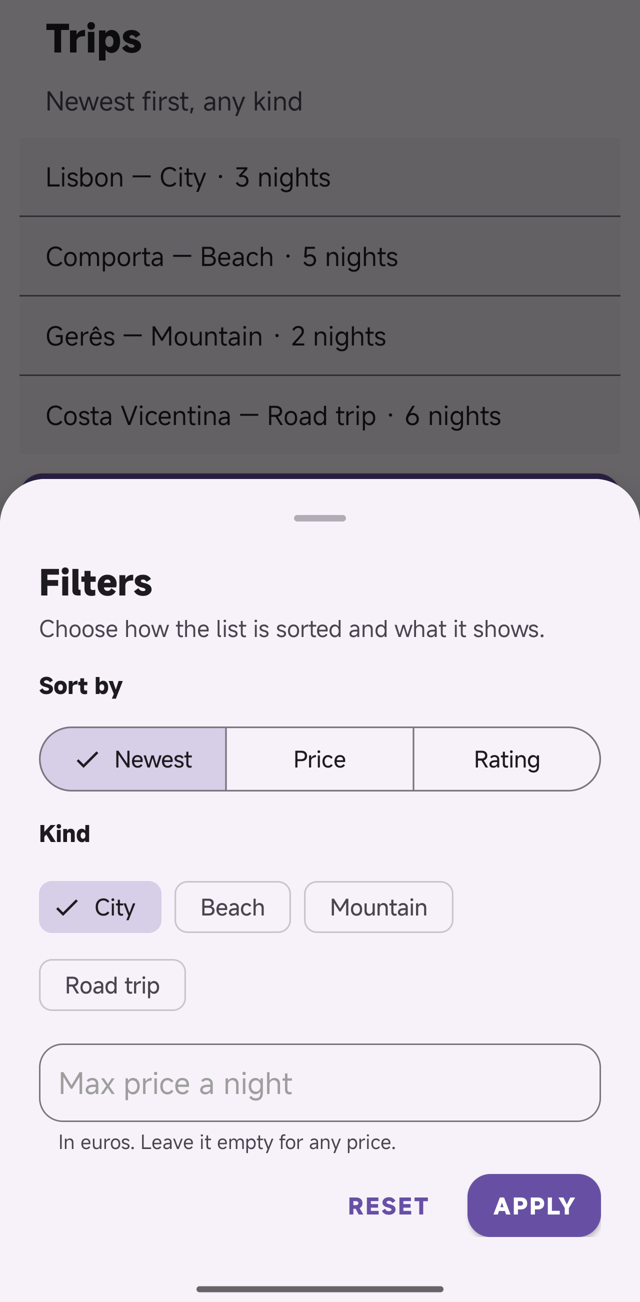
- The title and the text under it are optional:
bottom_sheet(screen=home)is a sheet with only what you put in it. - Anything that goes in a container goes in a sheet -- labels, chips, fields
with help and errors, rows, buttons, a row of buttons in a
container.get_value()andset_value()work on them whether the sheet is open or not, and what was typed is still there the next time it opens. - The body is a column as wide as the sheet, with 24 at the sides and 12
between components. CSS on the sheet's
idchanges that, andbackground-colorthere is the colour of the whole sheet:filters { gap: 20px; background-color: #101418; }. filters.open()andfilters.close()work from any function, including one written above the sheet --apply()here has to come first, because the button in the sheet names it.- A sheet is as tall as what is in it, up to the height of the screen less 56 at the top; taller content scrolls inside the sheet on the phone. Keep a sheet short: a long form is a screen.
A sheet of components takes no items=, and a component whose parent= is
a sheet with no screen= stops the build with U2045: it showed in the
Previewer and was dropped on the phone. On the phone the sheet is Material's
own bottom sheet around a layout ApkPy writes; the sizes are in
sheet_rules.py, which the Previewer draws from.
Modal
delete_dialog = modal(
    "Delete download?",
    content="The track will remain in your library.",
    confirm_text="Delete",
    cancel_text="Cancel",
    on_confirm=lambda: files.delete("track.mp3"),
)
Menus and tooltips
more = button("More", variant="icon", icon="more_vert", screen=home)

popup_menu(
    anchor=more,
    items=["Share", "Download", "Remove"],
    on_select=handle_option,
)

context_menu(
    target=track_row,
    items=["Play next", "Add to playlist"],
    on_select=handle_track_option,
)

tooltip(more, "More options")
Desktop right-click maps to Android long-press for context menus.
Pickers and snackbar
date_dialog = date_picker(
    title="Choose a date",
    on_select=lambda value: selected_date.set_value(value),
)

time_dialog = time_picker(
    title="Choose a time",
    on_select=lambda value: selected_time.set_value(value),
)

snackbar(
    "Track removed",
    action="Undo",
    on_action=restore_track,
    duration=4000,
)
Loading skeleton
Available variants are music_card, list, card and text. Use loading.show() and loading.hide().
Empty and error states
empty = empty_state(
    "No tracks yet",
    message="Add music to see it here.",
    icon="library_music",
    action="Explore",
    on_action=open_explore,
    visible=False,
    screen=library,
)

failed = error_state(
    "Could not load the library",
    message="Check the connection and try again.",
    retry=load_library,
    retry_text="Try again",
    visible=False,
    screen=library,
)
A typical async flow hides all states, shows the loading state, then reveals either content, empty state or error state after the result arrives.