ApkPy 1.7.0 — Device features and notifications
ApkPy 1.7.0 — 8 September 2026
Upgrade with python -m pip install --upgrade apkpy==1.7.0.
Regenerate your Android project to include the compiler and runtime fixes.
The update adds three native sensor streams to the existing sensors API.
Write one callback, rehearse it with explicit Previewer controls, and use the
same app source for real Android sensors.
It also adds static wallpapers with an image preview and mandatory confirmation.
Extended notifications add actionable updates on Android and a redesigned,
persistent notification drawer in the desktop Previewer.
New in 1.7.0
| API | Reading | Example use |
|---|---|---|
sensors.accelerometer(on_change=handler) |
X/Y/Z acceleration, including gravity, in m/s² | tilt and motion feedback |
sensors.gyroscope(on_change=handler) |
X/Y/Z rotation rate in rad/s | rotational motion controls |
sensors.pressure(on_change=handler) |
atmospheric pressure in hPa | barometer display when hardware is present |
The two motion callbacks receive one JSON string with numeric x, y and
z fields. Pressure keeps the existing scalar-text convention. Each watch
supports sensors.available("name") and sensors.stop("name").
Native Android uses SensorManager; the new sensors add no dependency or
runtime permission. Their data stays local unless the application explicitly
sends or stores it. The generated app still contains no Python runtime.
Persistent notifications and an in-device drawer
The extended notify() API adds channels and importance, Material icons,
big-text/picture/inbox styles, up to three actions, tap and dismissal callbacks,
progress, ongoing flags and grouping. notifications provides channel
declarations, permission checks/requests and cancellation. The original
three-argument form remains compatible.
The Previewer now keeps cards in a drawer inside the device window. A high-importance heads-up disappears after about four seconds, but its card stays in the drawer. Actions are callable, cards expand, progress animates, and the UI follows the light/dark theme. No notification Toplevel is opened.
A clearer desktop notification UI
The fixed header keeps the count, close and Clear all controls visible while cards scroll. Rounded cards separate app/time, title and message; full-area action pills wrap long labels on small screens. The light theme no longer uses a heavy dark-grey drawer background. Empty and permission states are explained inside the device window. Picture/inbox expansion and determinate/indeterminate progress share the same design; wide windows center their content.
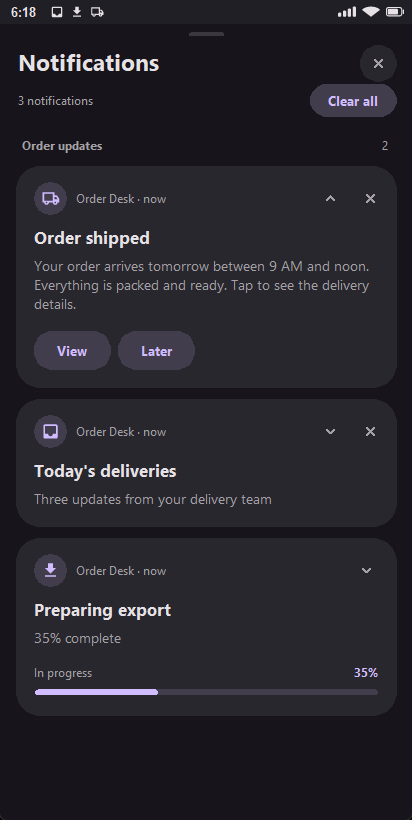
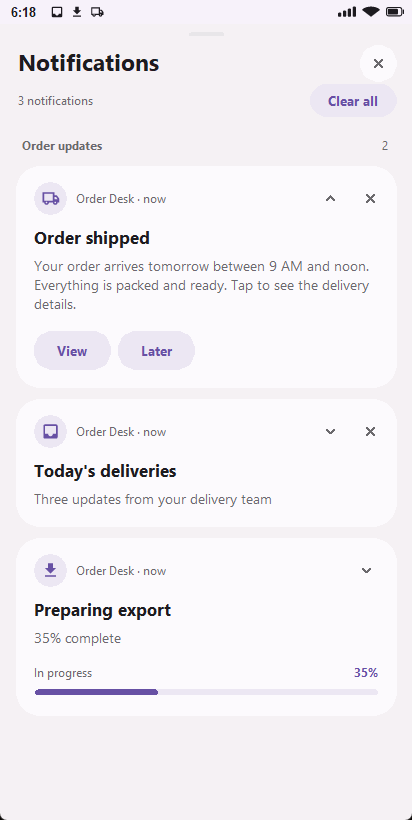
These are real desktop captures, not Android screenshots. Android continues to control its notification shade, including its colours, spacing and buttons.
Android uses one shared publisher for local notifications, workers and the ApkPy Firebase service, with immutable PendingIntents and Android 13+ permission requests. A worker-generation bug was also fixed: helpers now use its application Context instead of unavailable Activity methods.
The Order Desk lab now makes its actions explicit: View opens the order
details and removes the card; Later removes it with a visible confirmation.
Later does not schedule a reminder. The job callback uses def task():;
it receives no job or payload arguments. A compiler drawable-name collision
that made the first permission button's label invisible was also corrected.
Read the notification guide for complete examples, real Previewer captures, the downloadable lab, and limits such as Android 14+ ongoing dismissal and deferred dismiss callbacks.
Portable regular expressions
re.match, re.search, re.sub and re.findall now generate native Java
regex operations for the documented subset. Patterns and flags are constant;
input text and replacement strings can come from your app. Read Match captures
and positions in the matching function, then pass ordinary strings onward.
Unsupported constructs fail with C1701, rather than silently changing meaning.
This enables format validation, reference/hashtag extraction, cleanup and redaction. It does not prove that an email inbox exists or validate a document's checksum. Calls are synchronous: keep UI input bounded and avoid pathological patterns. No regex timeout or ReDoS-proof guarantee is provided.
Read the subset and limitations or download the Text Toolkit app.
Values survive Android screen recreation
Values written with set_value() are restored after Activity recreation,
including empty text and supported form controls. This fixes a general case
where rotation or a theme change rebuilt the original XML and silently lost
the value. Screens remain isolated; a fresh launch uses its defaults.
The regression app checked generated buttons, text/form values, repeated recreation, portrait/landscape, light/dark and screen isolation on Android 16. Process-death recovery was not tested on the physical device in that run.
Existing sensors are documented too
Shake detection, compass, steps, ambient light and proximity were already
implemented. This update's documentation now covers all of them, plus
battery.level(), battery.charging() and battery.saver().
The Sensors and battery guide includes:
- the callback and return type for every public method;
- a complete existing-sensors and battery app;
- a complete acceleration monitor and gyroscope/pressure variants;
- downloadable Sensor Lab app code;
- availability, step permission, waiting states and Start/Stop;
- simulation controls, measurement units, thresholds and troubleshooting.
Lifecycle and generation fixes
- Sensor-only apps no longer reference the step-permission launcher unless they actually watch steps. Previously those references could break Java compilation in an app using another sensor.
- Shake and raw acceleration share one optional accelerometer manifest feature.
- Listener registration uses Android's success result rather than marking a failed registration as active.
- Queued readings are discarded after a watch has stopped or paused.
sensors.stop(name="gyroscope")honours its keyword argument.
These fixes are scoped to the sensor runtime.
Static wallpaper, only after confirmation
Three lines of your code, and Android draws the confirmation:
from apkpy_lib import Screen, button, gallery, label, run, wallpaper

home = Screen(id="home")
status = label("Nothing has changed.", id="status", screen=home)


def finished(success, reason):
    if success:
        status.set_value("Completed: " + reason)
    else:
        status.set_value("Not changed: " + reason)


def image_chosen(success, path):
    if success:
        wallpaper.set(path, target="home", on_result=finished)


def choose():
    if wallpaper.available():
        gallery.pick(on_result=image_chosen)
    else:
        status.set_value("Not allowed on this device.")


button("Choose image", id="choose", command=choose, screen=home)
run(start_screen=home)
target is "home", "lock" or "both". wallpaper.available() answers
whether this Android user and this device policy allow the change at all.
Nothing is written without a person seeing the image first. wallpaper.set
decodes the picture, shows it in a dialog with the target spelled out, and only
the Apply button reaches WallpaperManager. There is no silent form of this
call. A bundled image works the same way:
A literal filename is resolved against your project and copied into the app's assets at build time; a missing file is a build error naming the line, not a runtime surprise.
Only an app that calls wallpaper.set() gets SET_WALLPAPER in its manifest.
Calling available() alone does not add it, and an app that never mentions
wallpapers gets no helper class at all.
Your screen is rebuilt straight afterwards
Worth knowing before you write the callback. Changing the wallpaper changes the system palette, and that is a configuration change: about a second later Android destroys your screen and rebuilds it from the layout, wiping whatever the callback just wrote.
Measured on a phone running Android 16 -- the window handle changed and a
correct Completed: ok was replaced by the screen's original text a second
later. It looked exactly like a failure, while the wallpaper had changed.
ApkPy keeps the answer and tells the rebuilt screen the same thing, so the status line above survives. The one consequence for your code is that a callback doing something countable can run twice:
def finished(success, reason):
    status.set_value("Completed: " + reason)   # safe: written again, same text
    toast(reason)                              # careful: two toasts
Anything that must happen once belongs behind a flag in state(), which lives
in the process rather than in the screen and is therefore not reset by the
rebuild. Leaving the app normally and returning does not replay the answer.
The wallpaper guide has the full treatment: the Wallpaper Lab app source, every image source, all ten result codes, and the once-only recipe. No live wallpapers, no silent changes, no automatic downloads.
Verification, without hiding the limits
| Check | Result |
|---|---|
| Feature suite during sensor validation | 913 tests passed at that stage, including 47 sensor tests; later notification regression results below |
| Previewer | numeric formatting, thresholds and actual Tk slider command dispatch checked |
| Generated project | compiled successfully with Gradle and JDK 21 |
| Android 16 device | real accelerometer/gyroscope readings, Start, Stop and restart checked |
| Activity pause/resume | sensor registrations removed and restored on the device |
| Missing barometer | explicit unavailable state verified |
| Physical pressure readings | not verified: the test phone has no barometer |
| APK contents | no .py, .pyc, libpython or Chaquopy entries found |
| Wallpaper tests | 29 focused tests, four of them for the screen rebuild |
| Wallpaper Android project | compiled with Gradle, including a bundled-image button |
| Physical wallpaper application | verified on a Xiaomi running Android 16: gallery, confirmation, Apply, and the status line surviving the rebuild |
| Repeated wallpaper changes | verified: a second and third apply in one session, each rebuilding the screen |
| Wallpaper Cancel on a device | not verified: only the Apply path was driven |
Notification follow-up — 8 September 2026
| Check | Result |
|---|---|
| Feature suite after Previewer redesign | 970 passed, including 21 focused notification tests |
| Transpiler regression suite | 258 passed, 0 failed |
| Notification guide | All four Python blocks generated Android Java/XML |
| Desktop interaction and visual tests | Passed: actual Tk actions, 320px/620px layouts, wrapped labels, scroll/header, permission/empty states and animated progress |
| Native Notification Lab | Gradle build and 39 instrumentation checkpoints passed on Android 16 / API 36 |
| Actual device notification drawer | View opened Order #42; Later removed the card and confirmed without scheduling |
| Firebase integration | Generated project built; real remote delivery not tested |
The desktop redesign did not require a new Android implementation. These counts describe the recorded checks, not a guarantee that every Android/OEM configuration works. The examples contain app code, not the library engine.
This is one device, not a certification across every Android manufacturer. Documentation examples are transpiled rather than only read: every Python block in the wallpaper guide is compiled to Android during verification, and the two callback recipes were checked in the generated Java rather than assumed.
Before using a sensor in your app
Check that it exists. Start only when the user needs it, and stop when the interaction ends. Android suspends these watches with the Activity; this is not a background fitness-recording service. Step counting is per watch, not a daily history. A gyroscope measures rotation rate, and a pressure reading is not a calibrated altitude.
The Previewer provides deliberate simulation, not access to a tethered phone's hardware. Test your final APK on the devices you intend to support.