Notifications that stay in the drawer
Available in ApkPy 1.7.0
The existing notify(title, message, id) form is unchanged. The extended
arguments and notifications object require ApkPy 1.7.0 or newer.
Use notifications for delivery updates, completed exports, background jobs and inbox summaries. They are not dialogs: the person can leave them in the drawer and return to your app later. No Python runtime is added to the APK.
Complete example: a delivery update
Copy this into writehere.py. Run it, choose Allow notifications, then
Send update. In the Previewer, click the clock/status strip to open the
drawer; on Android, open the system notification drawer.
from apkpy_lib import (
    Screen, Theme, app_bar, label, button, run, notify, notifications,
    on_click_navigate, toast,
)

home = Screen(id="home", scroll=True)
detail = Screen(id="detail", scroll=True)
app_bar("Order Desk", screen=home)
app_bar("Delivery details", screen=detail)
status = label("No update sent", screen=home)
label("Order #42 arrives tomorrow, 9 AM to noon.", screen=detail)

notifications.channel("orders", "Delivery updates", importance="high")


def view_action():
    notifications.cancel("order_42")
    status.set_value("Order #42 opened")
    on_click_navigate(detail)


def later_action():
    notifications.cancel("order_42")
    status.set_value("Notification cleared — no reminder scheduled")
    toast("Notification cleared. Check the order later.")


def go_home():
    on_click_navigate(home)


def dismissed():
    status.set_value("The update was dismissed")


def send_update():
    notify(
        "Order shipped",
        "Your order arrives tomorrow between 9 AM and noon. "
        "Expand this card to read the full delivery update.",
        id="order_42",
        channel="orders",
        icon="local_shipping",
        style="big_text",
        actions=[("View", view_action), ("Later", later_action)],
        on_tap=detail,
        on_dismiss=dismissed,
        group="orders",
    )


def request_permission():
    notifications.ask()


def check_permission():
    if notifications.allowed():
        status.set_value("Notifications are allowed")
    else:
        status.set_value("Notifications are disabled")


def clear_order():
    notifications.cancel("order_42")


button("Allow notifications", command=request_permission, screen=home)
button("Check permission", command=check_permission, screen=home)
button("Send update", command=send_update, screen=home)
button("Cancel update", command=clear_order, screen=home)
button("Back to Order Desk", command=go_home, screen=detail)
run(start_screen=home, theme=Theme(mode="dark"))
In this example, View opens the details and removes the card. Later removes the card and shows a confirmation; it does not schedule a reminder. The callbacks explicitly cancel the card: actions do not automatically cancel every notification, so other apps can keep reusable actions.
An action is an ordinary zero-argument callback. on_tap accepts a callback
or a declared Screen. On Android an action opens the Activity that posted
the notification; a worker uses the initial Activity. A Screen target opens
that specific screen. Callbacks work with an already-open Activity and when
Android creates a new one from the notification.
on_dismiss is different: dismissing a notification does not launch the app.
If its Activity is active, the callback runs there. Otherwise Android saves
the event privately and delivers it when that Activity resumes. Do not use
this callback for time-critical background work. Programmatic cancel() and
cancel_all() do not call on_dismiss.
API reference
notify(title, message, id="apkpy_notification", *,
       channel="apkpy_default", icon="bell", style="none",
       picture=None, lines=None, actions=None, on_tap=None, on_dismiss=None,
       ongoing=False, progress=None, group=None, when=None)
Posting submits an update; it does not return a delivery receipt. In particular,
notifications.allowed() does not guarantee that Android will display a
heads-up banner, play a sound or allow the chosen channel.
| Argument | Default | Meaning |
|---|---|---|
title, message |
required | Notification heading and body |
id |
"apkpy_notification" |
Reusing an ID replaces that card; different IDs accumulate |
channel |
"apkpy_default" |
Declare custom channels before posting |
icon |
"bell" |
Literal name from the shared icon catalogue; Android uses a monochrome small icon |
style |
"none" |
Literal none, big_text, big_picture or inbox |
picture |
None |
Local image or Android content:// URI; only for big_picture |
lines |
None |
List of strings; only for inbox |
actions |
None |
Up to three (label, zero_argument_callback) pairs |
on_tap, on_dismiss |
None |
See callback behavior above |
ongoing |
False |
Marks an in-progress notification; does not start a foreground service |
progress |
None |
Number from 0 to 100 or "indeterminate" |
group |
None |
Shared group key; two or more active cards get an Android summary |
when |
None |
Epoch UTC milliseconds; omitted means now, not scheduled delivery |
Only title, message and id may be positional. The remaining arguments
are keyword-only. Callbacks, action lists, icon names, styles and channel
importance are declared statically; titles, messages, IDs and progress can
come from your app's state. A local literal picture is bundled relative to
the project directory. Dynamic filenames refer to files on the device.
HTTP image URLs are not downloaded by notify.
| Method | Behavior |
|---|---|
notifications.channel(id, name, importance="default") |
Create a channel, or update its display name |
notifications.allowed() |
Boolean app-level permission snapshot; not proof a particular channel is enabled |
notifications.ask() |
Ask for notification permission from a screen on Android 13+; simulated choice in Previewer |
notifications.cancel(id) |
Remove that card, including one marked ongoing |
notifications.cancel_all() |
Remove cards posted by this API and its push integration, not unrelated media/service notifications |
Permission and channel rules
- APK generation adds
POST_NOTIFICATIONSonly when this feature or push is used. The Android 13+ request uses the Activity Result API. - The first Activity
notify()also requests permission if needed and queues the update until the decision. Prefer asking after an explicit button tap. A worker cannot display a permission prompt; request it in your screen first. The Previewer starts with simulated permission enabled; useask()to rehearse allowing or denying it without touching the computer's permissions. importanceismin,low,defaultorhigh. High permits heads-up display, but Android's channel settings, Do Not Disturb and device policy have the final say. A high channel does not guarantee sound or a popup.- Importance is fixed when a channel is first created. Calling
channel("orders", ..., importance="high")after creatingordersas low does not raise it. The person can change settings, or your app can declare a genuinely different channel with a new ID. ongoing=Trueis a native flag, not a promise that users cannot dismiss a card. Android 14+ lets people swipe away many ongoing notifications while unlocked. The Previewer protects ongoing cards from its dismiss controls. See Android's ongoing-notification change.
Callback signatures and cancellation
| Callback | Signature | What it should do |
|---|---|---|
An entry in actions |
handler() |
Explicitly navigate, update state, cancel, or start supported work |
on_tap |
handler() or a declared Screen |
Open the relevant content |
on_dismiss |
handler() |
Handle a user dismissal; may be deferred until its Activity resumes |
background_job(..., run=task) |
task() |
Execute the job; it does not receive job and payload parameters |
Pass the function itself, not handler(), in an action declaration. The words
View and Later are just labels: ApkPy does not infer navigation or
scheduling from them. The complete example implements their behavior explicitly.
An action does not cancel a reusable card automatically. Use
notifications.cancel(id) inside its callback when that is the intended result.
Programmatic cancellation does not emit a user-dismissal callback.
Inbox and progress variants
Add these callbacks to the first example and bind them to buttons. A group summary appears once at least two IDs in the same group are active.
def send_digest():
    notify("Today's deliveries", "Three order updates", id="digest",
           channel="orders", icon="inbox", style="inbox", group="orders",
           lines=["#42: shipped", "#43: packing", "#44: delivered"])


def show_export():
    notify("Exporting", "35% complete", id="export",
           progress=35, ongoing=True, icon="download")


def finish_export():
    notify("Export complete", "Ready to open", id="export",
           progress=100, ongoing=False, icon="check")


def waiting_export():
    notify("Preparing export", "Waiting for data", id="export",
           progress="indeterminate", ongoing=True, icon="download")
progress only displays a value; it does not perform the export. Updating
the same ID preserves one notification rather than adding another card.
Picture chosen by the user
This standalone example uses the gallery result as the image source. Android
decodes notification pictures on a background executor and downsamples large
images. A missing literal asset fails generation with a diagnostic; an
unreadable runtime URI is logged as Notification invalid_picture and is
not posted. Cancelled or superseded image loads cannot post an old card.
from apkpy_lib import Screen, button, gallery, label, notify, run

home = Screen(id="home")
status = label("Choose a picture", screen=home)


def chosen(success, path):
    if success:
        notify("Selected picture", "Expand to view", id="photo",
               style="big_picture", picture=path, icon="image")
        status.set_value("Picture submitted")


def choose():
    gallery.pick(on_result=chosen)


button("Choose picture", command=choose, screen=home)
run(start_screen=home)
The Previewer can load desktop files, not Android content:// URIs. A
bundled picture is demonstrated in the downloadable lab project below.
Notify when a background job finishes
This is a complete example. The job runs off the UI thread and posts a native notification; it does not call an Activity or attempt to ask for permission.
from apkpy_lib import Screen, button, background_job, notify, notifications, run

home = Screen(id="home")


def request_permission():
    notifications.ask()


def task():
    notifications.channel("work", "Background work", importance="low")
    if notifications.allowed():
        notify("Work complete", "The queued task finished", id="completed",
               channel="work", icon="check")


# run callbacks receive no positional arguments in Previewer or Android.
worker = background_job("notification_task", run=task)


def start_work():
    worker.enqueue({})


button("Allow notifications", command=request_permission, screen=home)
button("Start work", command=start_work, screen=home)
run(start_screen=home)
Firebase push
push.listen(auto_notify=True, channel_id=..., channel_name=...) uses the
same native publisher for messages handled by ApkPy's Firebase service.
push.simulate() uses the same persistent Previewer model. auto_notify=False
keeps automatic cards off; your own callback can call notify() explicitly.
Firebase notification payloads received while the app is in the background can be displayed by the Firebase SDK itself. To control all presentation in your app, use data-only messages and handle them appropriately; delivery still depends on FCM and Android policy. This change does not supply Firebase credentials, a server, or a guarantee of delivery. See the Firebase guide.
Previewer controls and honest limits
The preview drawer is an overlay inside the existing device window: no new
Toplevel. Click/drag the status strip down to open it, use the chevron to
expand a card, and swipe up or press Escape to close. Tap an action to run its
callback. Swipe a card sideways or use its × to dismiss it. Clear all keeps
ongoing cards. Calling cancel_all() explicitly removes them too.
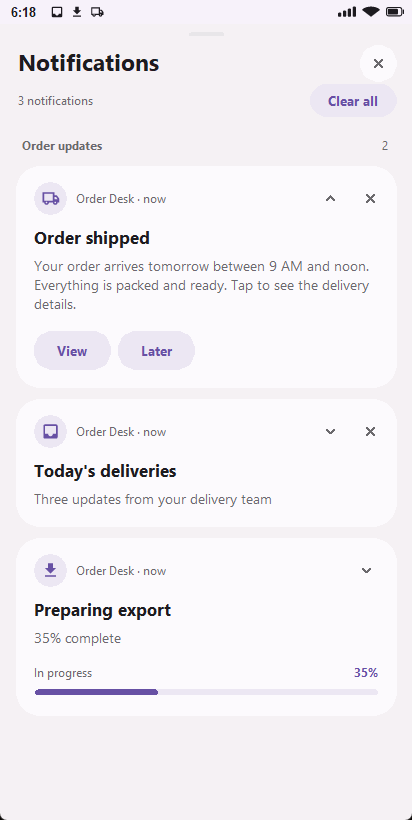
The header stays visible while the cards scroll. Actions have full button-sized hit areas, long labels wrap, and expanded cards show the complete message. Light and dark surfaces follow the app theme; this Previewer styling does not replace Android's system-controlled notification appearance.
Redesigned desktop drawer
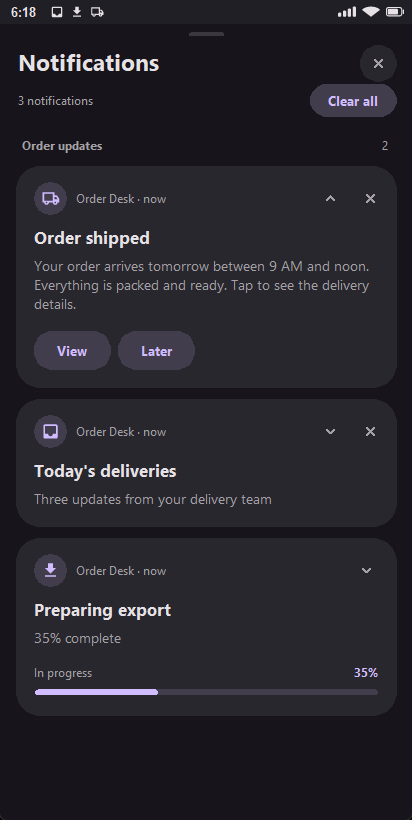
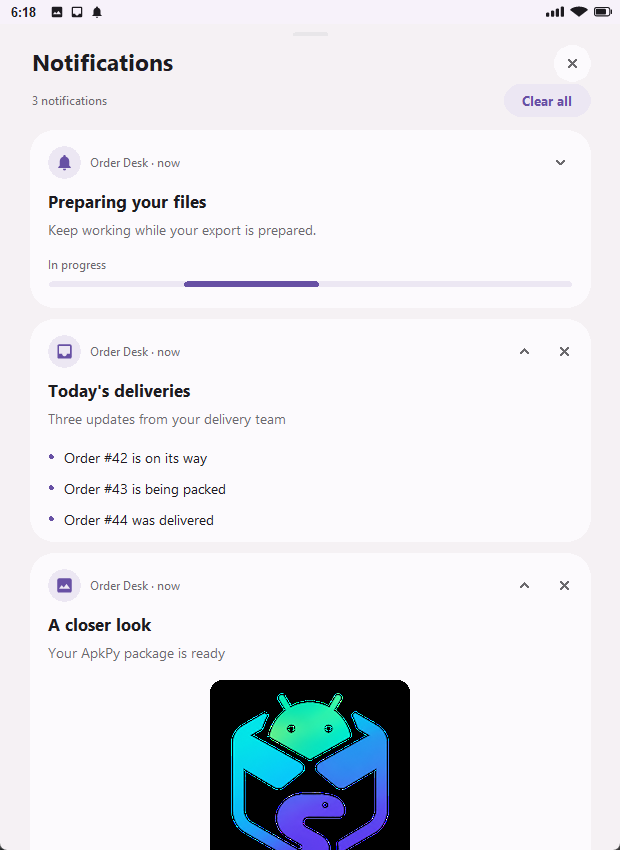
- Rounded cards use a separate title, body and app/time line, with a soft icon background. Collapsed long messages show a two-line excerpt; expand to read more.
- Use the mouse wheel over the cards to scroll. Notifications, the card count, close and Clear all stay in the fixed header. Updating a card keeps the scroll offset where possible, clamped if the content becomes shorter.
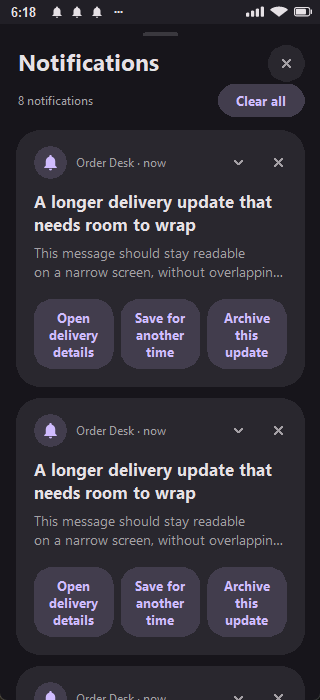
- Action pills are clickable across their entire background, not only on the letters. Their labels wrap on compact screens instead of overflowing.
- Progress uses a rounded track and percentage, or an animated indeterminate segment. These are display states, not an actual download/export operation.
- Expanded picture cards preserve the image aspect ratio. Inbox lines receive their own rows. Wide windows center the cards instead of stretching them across the whole viewport.
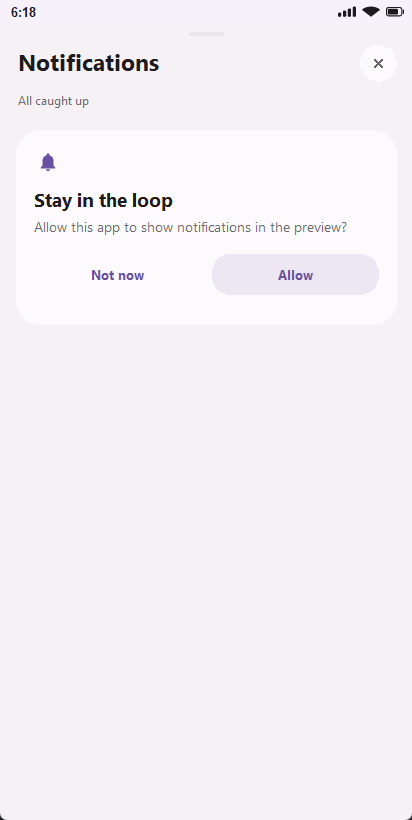
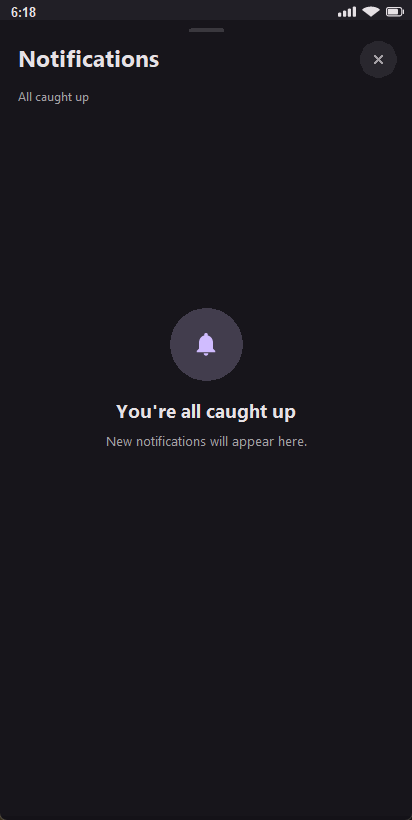
- Empty drawers and simulated permission requests have their own explanatory states. There is no extra notification popup window to manage.
No new styling argument is required: use the app's existing Theme(mode="dark")
or Theme(mode="light") and theme tokens. The drawer follows them automatically.
Its colours and shape are a desktop design, not a pixel-identical recreation
of the notification shade on every Android brand.
High-importance heads-up cards stay for approximately four seconds. Only that temporary banner disappears: the notification remains in the drawer. The status strip shows up to three notification icons and an overflow mark.
| Behavior | Previewer | Android |
|---|---|---|
| Drawer and cards | Drawn inside the device; theme tokens | System notification UI; appearance varies by Android/device |
| Actions, tap, progress and grouping | Simulated with real Python callbacks | Native notifications and immutable PendingIntents |
| Permission | Local simulated choice | Actual app permission and channel settings |
| Sound/vibration | No | Subject to channel and device settings |
| Lock screen | Not simulated | Subject to device privacy/settings |
| Survives app process closing | No | Normally yes; force-stop, uninstall and system policy are exceptions |
| Tap opens a closed app | Only while the preview process runs | Yes, through the Activity PendingIntent |
| Ongoing dismissal | Protected in preview | Version/device dependent; Android 14+ allows some swipes |
| Dismiss callback while app is closed | Preview process must run | Queued until its Activity resumes; no forced launch |
Actual Previewer screenshots
These are captures of the running Tk renderer, not design mockups.
Compact labels, the permission prompt and the empty state were checked too:
Troubleshooting
| Symptom | Check |
|---|---|
| Nothing appears | App permission, channel settings and the channel declaration; inspect Notification not_allowed in Logcat |
| Importance change seems ignored | Channels keep their original importance; see the rules above |
| Cards overwrite one another | Use different IDs; the legacy default intentionally updates one card |
| Action never runs | Use a declared zero-argument function or zero-argument lambda, not a function call |
| View appears to do nothing | The callback must do something visible, such as navigate; changing only a hidden status label can be easy to miss |
| Later does not remind me later | Its label does not schedule work; the lab explicitly clears the card without scheduling a reminder |
task() missing ... job ... payload / P3008 |
Declare def task(): for background_job(..., run=task); the callback receives no positional arguments |
C1710 during generation |
Check the named argument, literal style/icon, maximum of three actions and callback declaration; the diagnostic points at the declaration |
| Dismiss callback runs later | Its Activity was not active; dismissal does not force it to open |
| Picture does not appear | Local readable asset/path or granted content URI, and style="big_picture"; no HTTP URL |
| Four actions fail generation | Android supports at most three; combine or move secondary actions into the app |
| Worker cannot ask permission | Ask from a screen before starting background work |
| A high-priority preview banner disappears | It expires after about four seconds; open the drawer to see the persistent card |
| Preview looks unlike the phone | Android owns its system UI; only the desktop drawer follows ApkPy's theme |
RemoteViews, bubbles, conversation shortcuts and notification scheduling are not included. Media notifications continue to use the existing audio feature.
Runnable lab
Download the complete Order Desk project
or read its app code.
The project includes apkpy.toml and its local picture, with no library source.
It exercises all four styles, two actions, a Screen tap, dismissal, grouping,
progress updates, permission controls and a WorkManager job.
What each lab control should do
| Control or gesture | Expected result |
|---|---|
| Allow notifications | Preview: simulated choice; Android 13+: request when allowed by the system's permission state |
| Check permission | Update the app's status with the app-level permission snapshot |
| Send order update | Post/update order_42; expand to see the full message and View/Later |
| View, or tap the order card | Open the Order #42 details and remove the non-ongoing card |
| Later | Remove the order card and show confirmation; no reminder is scheduled |
| Swipe away the order / its dismiss control | Remove it and deliver the user-dismissal callback under the lifecycle rules above |
| Send inbox digest | Post digest; expand for its three lines; grouped with the order when both exist |
| Send picture | Post the bundled local picture; expand to view it |
| Show progress, then Finish progress | Update the same export card from 35%/ongoing to 100%/complete |
| Run background task | Queue the zero-argument task; it posts worker when it runs |
| Clear notifications (app button) | Cancel all notifications owned by this publisher, including ongoing cards |
| Clear all (Previewer header) | Dismiss only removable preview cards; ongoing cards stay |
The download contains example application code only. Run it with ApkPy 1.7.0 or newer; 1.6.1 does not provide the extended API.
Verification and recent fixes
The notification work was checked in the desktop renderer, generated Java and on a physical Android 16 / API 36 device. These are different kinds of evidence:
- Desktop: real Tk event dispatch for status-strip and action clicks, narrow (320px) and wide (620px) layouts, long labels, fixed header, scroll preservation, empty/permission states, pictures, inbox and animated progress. Both dedicated Previewer scripts passed; screenshots above come from those runs.
- Regression checks after the visual refresh: 970 feature tests, including 21 notification tests, and 258 transpiler checks passed. All four Python blocks in this guide generated Android Java/XML.
- Native: the Notification Lab built with Gradle; 39 instrumentation checkpoints passed. Separate taps on View and Later in the phone's actual system drawer confirmed navigation/cancellation and visible confirmation respectively.
- Firebase: generated integration code compiled with Gradle, but real remote delivery was not tested without a configured Firebase project.
The lab's background callback was corrected from task(job, payload) to task().
Its View/Later actions now have visible, explicit behavior. A separate compiler
fix prevents screens with different button styles from overwriting a shared
drawable filename, which had made the permission button's label invisible.
Worker helpers now use an application Context, and bundled notification
pictures go into Android assets. The desktop visual refresh does not alter the
phone's system-notification styling.
This is not a certification across Android versions or manufacturers. Previewer tests cannot establish phone permissions, lock-screen behavior or FCM delivery. Use the 1.7.0 release notes for the complete update.