ApkPy 1.3.2 — Persistent Tasks, Any-File Uploads, Icons & Motion
Version 1.3.2 is five things: work that outlives the screen that started it, a picker for any file type, a diagnostic engine that explains the parts of the pipeline that used to be silent, one icon table both runtimes draw from, and motion on a single dial.
The last two share a theme with the first three. ApkPy's hardest bug class is the Previewer and the phone quietly disagreeing, and this release closes several of those: icons that meant different things on each side, animation durations that were wrong in two different ways, and a placeholder that came back on Android and not on the desktop.
The first of them: work that outlives the screen that started it. A declared job keeps going when the app goes to the background, when the network disappears, when Android reclaims the process and across a reboot. The generated APK still contains no Python runtime, no WebView and no polling.
What changed
background_job()declaring persistent work backed by a WorkManagerOneTimeWorkRequest;- constraints
requires_network,requires_unmetered,requires_chargingandrequires_battery_not_low; - automatic retries with
retry="exponential" | "linear"andretry_seconds=; - unique work with
on_conflict="append" | "keep" | "replace"; enqueue(),cancel()andobserve(on_change=, screen=);input(),attempt(),progress(),retry()andfail()inside the job;- one JSON status document delivered identically by both runtimes;
- an on-disk Previewer queue that is restored when the script starts again.
sync_job = background_job(
    "sync_notes",
    run=sync_notes,
    requires_network=True,
    retry="exponential",
    unique=True,
)

sync_job.enqueue({"folder_id": "12"})
sync_job.observe(on_change=show_progress, screen=home)
Read the background jobs guide for the complete contract.
Offline Outbox
The new English demonstration queues messages that must be delivered even when the connection is not there:
- Outbox composes a message, queues it and shows the live status;
- Guide lists the five things to test, including a deliberate failure that exercises the backoff and the attempt counter.
Turning the network off holds the queue instead of failing it, turning it back on drains the queue in order, and closing the window with work pending restores it on the next start.
Native output
An app that declares one job receives two generated classes:
| Generated file | Size | Purpose |
|---|---|---|
ApkpyJobs.java |
4,760 bytes | one enqueue_<job> entry point per job with its constraints, backoff and policy, plus cancel and the WorkInfo status collector |
OutboxJobWorker.java |
16,561 bytes | the transpiled job body with getInputData(), setProgressAsync() and the attempt result, alongside the standard background-safe helpers |
observe() attaches to getWorkInfosByTagLiveData(...) rather than polling, so
progress survives rotation and resumes with the Activity — including after the
process was killed and WorkManager restored the queue.
"append" generates ExistingWorkPolicy.APPEND_OR_REPLACE. Plain APPEND
cancels newly appended work when the previous item failed or was cancelled,
which would silently break an offline queue after its first failure.
Measured conditional overhead
The same two-screen Offline Outbox application was generated twice: once as written, and once as a control with the job declaration removed and the buttons calling a plain function instead. The interface, styling and navigation are identical. Both clean projects were compiled with JDK 21, the same Android SDK and Gradle 8.7, with every one of the 31 tasks executed.
| Control | Generated files | Generated source | Debug APK | Clean build |
|---|---|---|---|---|
Without background_job |
30 | 142,719 bytes | 5,652,259 bytes | 43.8 s |
With background_job |
32 | 167,746 bytes | 6,068,041 bytes | 42.1 s |
The control receives no ApkpyJobs.java, no worker and no
androidx.work:work-runtime line in build.gradle; the two generated Java
files above are the only difference in generated output.
The APK difference is 415,782 bytes, or 7.36%, and it is almost entirely the WorkManager library and its transitive dependencies rather than generated code. This is a real cost and it is stated rather than hidden: persistent queues are worth 400 KB when an app needs them, and apps that do not declare a job never pay it. Startup and memory were deliberately left unreported because no device or emulator was connected; no estimate was invented.
Pick any file
Until now ApkPy could only pick images: camera.capture() and
gallery.pick(). uploads.file(...) accepted any file, but there was no way
for the user to choose one — the upload guide had to hardcode a path.
from apkpy_lib import Screen, button, files, label, run, uploads

home = Screen(id="home")
chosen = label("No file yet", id="chosen", screen=home)


def file_chosen(success, path, name, size, mime):
    if not success:
        chosen.set_value("Nothing chosen")
        return
    chosen.set_value(name + " · " + size + " bytes · " + mime)
    uploads.file("attachment", "https://api.example.com/files", path,
                 on_result=upload_done)


button(
    "CHOOSE A FILE", id="choose", screen=home,
    command=lambda: files.pick(on_result=file_chosen, types=["pdf", "docx"]),
)
on_result receives five values: (success, path, name, size, mime). The name,
size and MIME type are reported explicitly because they have to be — on
Android path is a content:// Uri from which an application cannot derive a
display name without querying the ContentResolver, while on the desktop it is a
real filesystem path. Returning the metadata separately removes every reason to
parse path, so the same code behaves identically on both runtimes.
Treat path as an opaque handle. Its supported consumers are the uploads.*
helpers. It is not managed by files.path(), files.exists() or
files.delete(), which address the application's own private folder, and it
cannot currently be displayed with an image component.
Filtering by type
files.pick(on_result=chosen, types=["pdf"])                 # one extension
files.pick(on_result=chosen, types=["pdf", "docx", "zip"])  # several
files.pick(on_result=chosen, types=["image/*"])             # a MIME family
files.pick(on_result=chosen, types=["application/pdf"])     # an exact MIME
files.pick(on_result=chosen)                                # everything
Every form is resolved in Python at build time, never on the device, so the
two runtimes cannot disagree about what "pdf" means. Android receives
EXTRA_MIME_TYPES; the Previewer receives a tkinter filter list.
Two deliberate decisions behind that:
- ApkPy does not call Android's
MimeTypeMap. Those tables differ between manufacturers, and a transpiler's output has to be reproducible. - A curated table wins over Python's
mimetypes, because on Windowsmimetypesreads the registry — a machine with Acrobat installed would otherwise answer differently from a clean CI box.
The filter is advisory. Many Android document providers ignore
EXTRA_MIME_TYPES entirely, so ApkPy always offers an "All files" entry on the
desktop as well; the Previewer must never be stricter than the phone. Validate
with the returned mime or name when it matters.
upload_button
When the whole interaction is "choose a file and send it", one call is enough:
from apkpy_lib import Screen, label, run, upload_button

home = Screen(id="home")
status = label("Idle", id="status", screen=home)


def progress_changed(percent, sent, total):
    status.set_value("Uploading " + percent + "%")


def upload_done(success, response):
    status.set_value("Sent" if success else "Failed")


upload_button(
    "SEND A FILE",
    url="https://api.example.com/files",
    types=["pdf", "docx"],
    fields={"folder_id": "42"},
    headers={"Authorization": "Bearer YOUR_TOKEN"},
    on_file=file_chosen,          # (path, name, size, mime) — optional
    on_cancel=nothing_chosen,     # ()                       — optional
    on_progress=progress_changed,
    on_result=upload_done,
    id="send", screen=home,
)
task_id defaults to the button's id, so a second tap restarts the upload
instead of racing a duplicate, and uploads.cancel("send") works.
upload_button is sugar, not a separate engine. The compiler expands it at
parse time into an ordinary button plus the two callbacks you would have
written by hand, so it inherits every theme, variant and icon a button has, and
the generated Java is byte-for-byte the same as the hand-written form. A
regression test asserts exactly that equality, which is what makes it
impossible for the shortcut to drift from the primitive.
Drop to files.pick + uploads.file when the upload has to be conditional —
rejecting a file over a size limit, for example. That case is why both layers
ship.
What the Android build receives
ActivityResultContracts.OpenDocument through the Storage Access Framework:
- no storage permission —
READ_EXTERNAL_STORAGEandREAD_MEDIA_IMAGESare never declared; - no manifest change, no FileProvider entry, no new Gradle dependency;
- the
OpenableColumnsquery runs off the interface thread, because a provider backed by Drive or OneDrive can block on the network answering it; - a device with no DocumentsUI (stripped AOSP, Android Go) reports a clean cancellation instead of crashing.
Diagnostics, considerably deeper
1.3.1 introduced friendly errors for a handful of cases. 1.3.2 makes them the rule: 64 codes across eight families, each with the reason behind the rule, the value received and ordered corrections.
Measured against every message the library actually raises: 166 of 167 are now matched by a specific rule. The one exception is an internal cancellation signal that never reaches an application.
Every diagnostic gained a Why this happened section and a Read more link:
APKPY U2006 - A value is outside the accepted set

Where:
  writehere.py:23
  avatar(

What happened:
  avatar status must be online, away, busy or offline

Why this happened:
  This argument selects a fixed Android construct at build time, so only the
  listed values exist. An unlisted value has nothing to compile to.

Expected:
  online, away, busy or offline
See Friendly errors for the complete code table.
Gradle failures are diagnosed
apkpy run and apkpy release now stream Gradle's output and keep it, so a
failure is explained rather than leaving a wall of log to scroll through.
Received leads with the line that names the file, the position and the
reason:
APKPY B5005 - The generated Java did not compile

Received:
  ...\app\src\main\java\com\apkpy\app\Screen_homeActivity.java:30: error: cannot find symbol
  symbol:   variable thisSymbolDoesNotExist
  location: class Screen_homeActivity
Eight signatures are recognised — unsupported Java version, missing SDK licences, AAPT resource linking, javac failures, out-of-memory, dependency downloads and device install refusals. An unrecognised failure still reports Gradle's own reason and the path of the generated project.
Compiler errors point at your code
The Android compiler reads writehere.py as text, so it has no Python frame to
report. It used to point at ApkPy's own source. It now carries the declaration's
line through to the diagnostic:
APKPY J7002 - The job's run function does not exist in this file

Where:
  writehere.py:17
  backup = background_job(
A silent divergence became loud
A real-time search filter that the generator cannot translate is now reported
as C4002 instead of a one-line note. The Previewer runs the lambda in Python
and keeps filtering; the APK would be generated without the filter. That
divergence is the hardest kind to notice, so ApkPy reports it rather than
shipping it.
A background job whose body raises is also reported in full now — with the job name, the attempt number, the payload keys and the fact that the item returns to the queue. It runs off the interface thread, where nothing else would show it.
One icon table, drawn properly
ApkPy had two unrelated icon systems: a hand-drawn Tk one in the Previewer and a vector one in the Android compiler. They shared 29 of their 48 names.
person had no drawing on the desktop and came out as a ring with a dot — the
single most common name in a bottom bar. skip_next had none on the phone and
came out as a solid black disc. Nine more names used by ApkPy's own examples
and docs had no drawing anywhere. None of it looked like a bug; it looked like
a design choice, which is why it went unreported.
Geometry now lives in one shared module that both backends read. The Previewer rasterises it with antialiasing instead of drawing 250 lines of canvas primitives that Tk could never smooth.
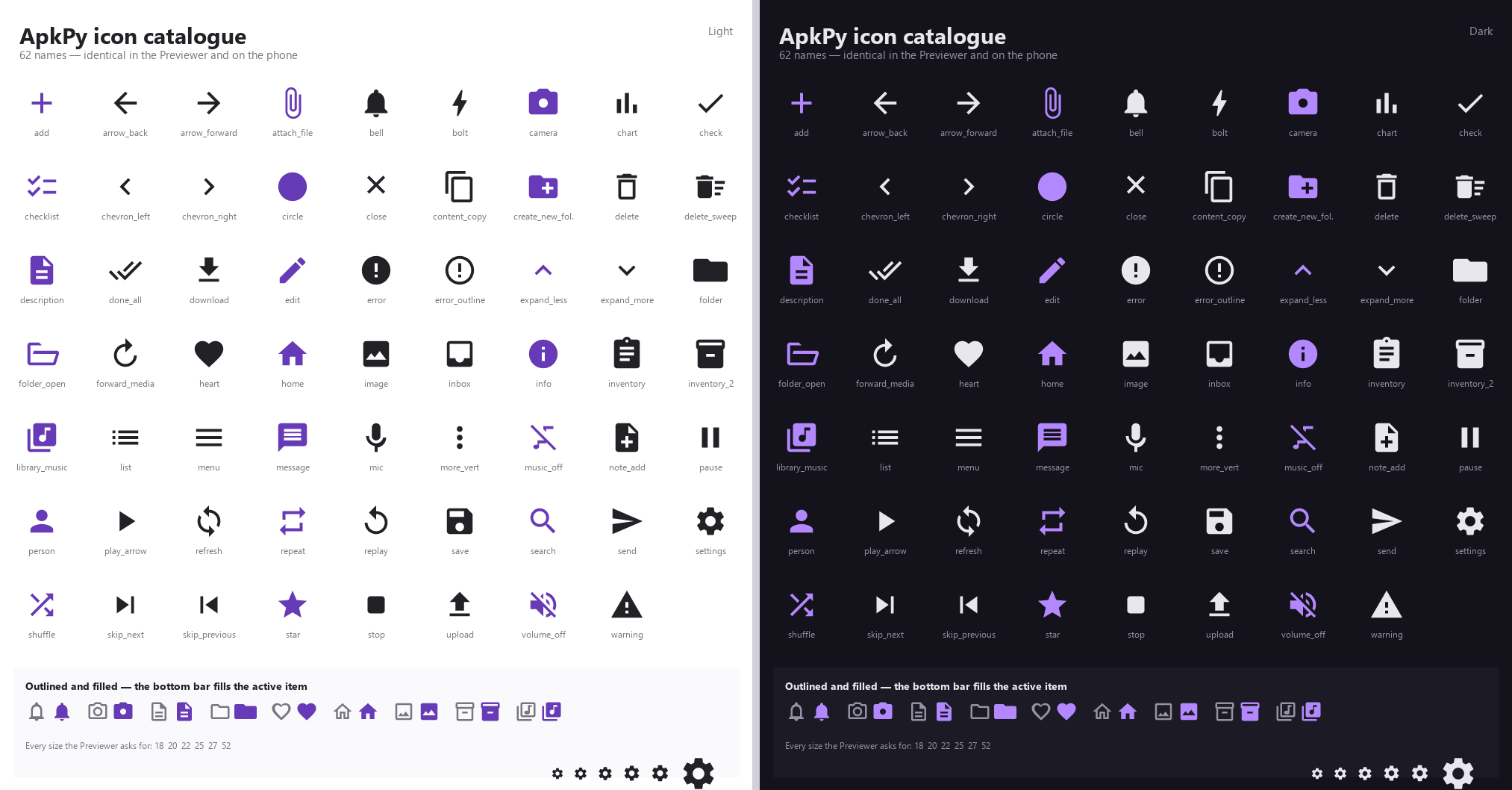
The picture is rendered by the library itself, through the call the Previewer makes. It cannot drift from what your app draws.
60 names, 88 with aliases. The regression suite walks every one and asserts both backends resolve the same path data, so an icon cannot mean one thing on the desktop and another on the phone.
Your own artwork
The .svg is read at build time, rescaled onto the 24x24 grid and turned into
an Android vector drawable — no bitmap in the APK, sharp at any size. viewBox
and nested transform= are applied; <rect>, <circle>, <ellipse> and
<polygon> are converted alongside <path>; arcs are supported because
exported SVG uses them constantly.
An icon is a single-colour silhouette, so shapes painted in a second colour are cut out rather than merged. Designers routinely fake a hole by painting a white shape on top of a dark one — correct in a browser, meaningless once everything is one colour, and without this the detail simply vanishes.
Five diagnostic codes cover the failures: an unknown name (U2015, a warning
with the closest match), a missing file, a stroke-only export, an element that
cannot be converted, and an unreadable file. Full detail in
Icons.
Motion, on one dial
Every visual state change used to be instantaneous and uncontrolled, and the two runtimes disagreed about it in ways that only appeared after a build.
Measured before the change:
| Previewer | Android | |
|---|---|---|
@keyframes animated |
opacity, margin-top |
plus margin-left and scale |
animation-duration: 0.5s |
0.5 ms | 5 ms |
| default duration | 600 ms | 1000 ms |
| easing curve | ease-out cubic | accelerate/decelerate |
| fade target colour | hard-coded #ffffff |
real alpha |
scale and margin-left did nothing on the desktop and worked on the phone.
Neither side understood seconds, so 0.5s was effectively instant in both —
differently. A fade in a dark app flashed white.
none, subtle, standard, expressive. Four moments scale from one base:
press 0.5x, bottom-bar item 0.8x, appear/disappear 1.0x, screen change 1.5x.
Both runtimes resolve durations from the same module, and a test asserts they
agree for every combination.
bottom_nav([home, about], icons=["home", "info"], indicator="pill")
on_click_navigate(detail, transition="slide")
The active bottom-bar item now fills: a pill lights up behind the icon and the icon goes from outline to solid. Thirteen navigation names ship an outlined variant; anything without one falls back to filled, and the pill still carries the state.
Screen transitions use overrideActivityTransition on API 34+ and
overridePendingTransition below, because the older call is deprecated at the
targetSdk ApkPy generates — without the guard the animation is silently
dropped on new Android versions. Tabs deliberately do not slide.
Turning animations off in Android's accessibility settings turns them off in
your app: the generated code reads ANIMATOR_DURATION_SCALE.
The vocabulary stops where the two runtimes stop agreeing. There is no screen
fade, because Tk cannot cross-fade two widget trees and shipping one would
mean the Previewer lies about the design. Details in
Motion.
Validation completed locally
| Area | Result |
|---|---|
| job declaration, constraints, backoff and policy | passed |
enqueue, cancel and observer wiring per screen |
passed |
input(), attempt(), progress() and outcomes |
passed |
| declaration collected before the module is visited | passed |
| unused helpers and result field omitted | passed |
Previewer status typing matches _jsonGet |
passed |
| Previewer offline hold and drain on reconnection | passed |
| picker filter, cancellation and result typing in both runtimes | passed |
upload_button generates the same Java as the primitives |
passed |
| both backends resolve the same path data for every icon | passed |
| every outlined variant is lighter than its filled form | passed |
| both runtimes resolve the same duration for every moment | passed |
| user SVG: viewBox, nested transforms, shapes and arcs | passed |
| bottom bar fills the active item on a physical build | passed |
| compiler/transpiler regression suite | 194 passed |
| focused Data Core and Reactive Data tests | 21 passed |
| focused friendly-diagnostic tests | 21 passed |
| focused file-picker and upload tests | 23 passed |
| focused icon tests | 34 passed |
| focused motion tests | 19 passed |
| all focused unit tests | 117 passed |
| generated Java compilation with Gradle | passed |
| installable debug APK produced | passed |
| APK installed and inspected on a Pixel 9 Pro emulator | passed |
| unused job runtime | omitted |
Fixed during this release
Running the features rather than only testing them caught these defects:
- A
returninside a generated worker did not compile.doWork()returnsResult, and the generator emittedreturn;. Early returns now produce the correct result. This was a pre-existing defect that also affectedservice.everyworkers, and it now has a regression test. - Previewer connectivity was wrong in both directions. A reachability check on port 53 reported offline on machines that block it; a route check alone reported online with the Wi-Fi switched off on machines carrying Hyper-V, WSL, VirtualBox or VPN adapters. Connectivity now requires a route and an answer on port 443.
- Status values were typed differently in each runtime. Numeric keys
returned integers in the Previewer and strings on Android, so
"pending " + status["pending"]worked on the phone and raisedTypeErroron the desktop. Every value is now a string, matching_jsonGet. -
Observer notifications stalled the queue. Delivering them straight from the worker thread blocked it; they now pass through an interface-thread pump.
-
db.text(choices=[...])broke the build. The generated field initialiser callednew JSONArray(String), whose checkedJSONExceptionit neither caught nor declared, so any model withchoices=failed to compile with unreported exception JSONException. It now uses theparseArrayhelper the list defaults already went through. - Upload progress reported different types on each runtime. The generated
Java calls the progress callback with three Strings, while the Previewer
passed integers — so
"Uploading " + percent + "%"worked on the phone and raisedTypeErroron the desktop. The Previewer now delivers strings too. Compare withint(percent), which the compiler translates toInteger.parseInt. - Upload lambdas could shadow an enclosing parameter. The emitted
(success, response) -> ...was invalid Java whenever the upload sat inside a callback that already had a parameter calledsuccess. The lambda parameters are now mangled. - Diagnostics no longer point at ApkPy's own source. When a failure happens entirely inside the library, no location is reported at all rather than a file the reader did not write.
-
Diagnostic output is normalised to ASCII, so Windows terminals with a legacy code page stop rendering dashes and quotes as
?. -
animation-duration: 0.5swas parsed as 0.5 ms in the Previewer and 5 ms on Android — neither side understood seconds, so the animation was effectively instant in both, differently. The default also differed: 600 ms against 1000 ms. - The two runtimes used different easing curves. Both now name Material's
standard curve,
(0.4, 0, 0.2, 1). - A
@keyframesfade interpolated towards a hard-coded#ffffff, so every fade in a dark app flashed white. scaleandmargin-leftanimated on Android and did nothing in the Previewer.inputs.set_value("")cleared the field but never restored its placeholder, so a form that clears itself after submitting went blank and stayed blank. Android'sandroid:hinthad always come back on its own.- CSS
placeholder-colorwas honoured on Android and ignored by the Previewer, which had a grey written into it in ten places. - Rounded containers re-measured themselves after the first paint, so a freshly rendered screen showed clipped cards and an input without its placeholder for about 250 ms before settling.
- The bottom bar's active pill was drawn in the same colour as the icon it sits behind, which hid the icon completely on a device.
render_diagnosticalways printed a Technical details heading, even when there was nothing under it.
Deliberate limits
This release does not add periodic jobs — that remains
service.every — nor cross-device synchronization,
conflict resolution or a server component. A job is local work with a
persistent queue.
The job body supports the same background-safe subset as an existing worker:
storage, db, https, notify and plain logic. Component calls need a
live Activity and are ignored.
https is synchronous inside the generated worker and asynchronous in the
Previewer, so the outcome of an attempt must be decided in the body of the job
rather than in an on_response callback. This divergence is documented in
Previewer versus Android.
- The picker returns one file.
multiple=Trueis not in this release. takePersistableUriPermissionis not requested. TheOpenDocumentgrant already outlives a pick-then-upload flow, and persisted grants are a scarce per-app resource that leaks silently.- When a document provider does not report a size, Android shows 0% for the
duration of the transfer and then jumps to 100%. Fixing that properly needs a
new indeterminate-progress contract, which would change the behaviour of the
already published
uploads.*API, so it is deliberately held back.
There is no screen fade. Tk cannot cross-fade two widget trees, so a fade
would work on the phone and not in the Previewer; the vocabulary is limited to
what both runtimes can actually do. Shared-element transitions — the list item
that grows into the detail screen — need Fragments, which is a rewrite of the
generator rather than a feature. Motion is a small, closed set of named
behaviours rather than an open animation API: the Previewer runs on Tk, which
has no vsync, and timing drift is not something a test catches after the fact.
Icons are single-colour silhouettes. Multi-colour artwork is reduced to one
tint, because Android's itemIconTint forces a single colour on the bottom bar
regardless.
Project ownership and future source availability are documented separately in the project continuity policy; current releases remain proprietary unless an explicit open-source transition is published.