Icons
Every icon= argument — on button, bottom_nav, action, empty_state,
error_state — takes a name from this catalogue or a path to your own .svg.
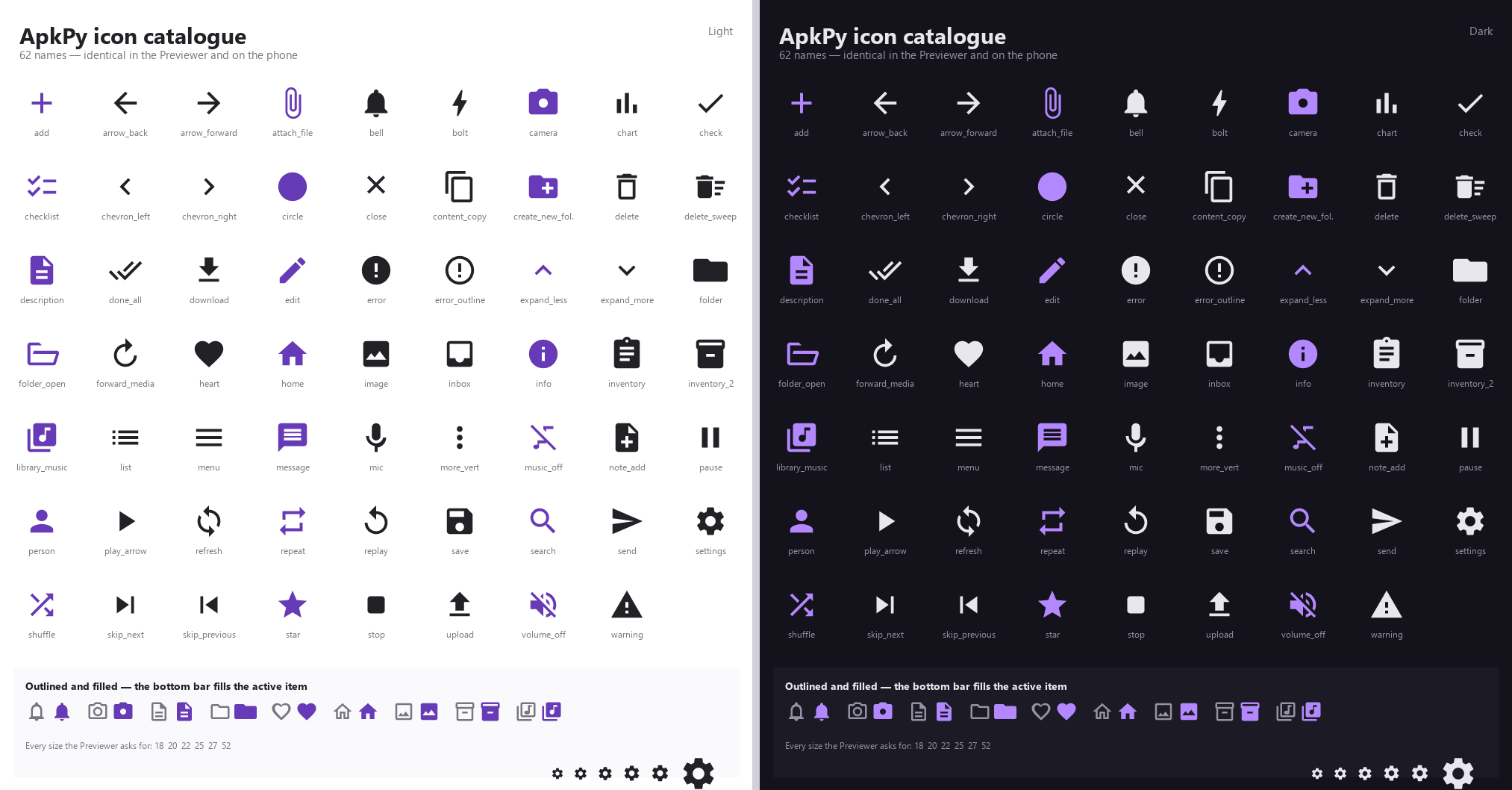
65 names, 96 with aliases, thirteen of them with an outlined variant as well. The picture above is rendered by the library itself, through the same call the Previewer makes, so it cannot drift from what your app actually draws.
One table, two backends
Icon geometry lives in a single shared module. The Previewer rasterises it with
antialiasing; the Android compiler writes it into a <vector> drawable. A
regression test walks every name and asserts both sides resolve the same path
data, so an icon cannot mean one thing on the desktop and another on the phone.
Icons are vectors, not images: they stay sharp at any size and add no bitmap to your APK.
Using a name
button("Save", icon="save", screen=home)
button("Delete", icon="delete", variant="danger", screen=home)

bottom_nav([home, profile], labels=["Home", "Profile"],
           icons=["home", "person"])
A name ApkPy does not know is drawn as a plain circle and reported once at
build time as U2015,
with the closest match it can find. It is a warning, not a failure — the build
continues.
Aliases
Some familiar names map onto a catalogue entry, so you rarely have to look one
up: favorite → heart, notifications → bell, photo → image,
trash → delete, play → play_arrow, retry → refresh,
profile/account/user → person, replay_5 → replay,
forward_15 → forward_media, microphone/voice → mic,
lightning/flash → bolt, copy → content_copy, submit → send,
chevron_down/arrow_drop_down → expand_more.
Composer controls
mic, send, stop, bolt, expand_more, expand_less and content_copy
are the set a chat-style input bar needs -- record, send, stop, the mode chip,
a disclosure chevron and copy-to-clipboard. chevron_right and chevron_left
are the sideways pair: chevron_right is what tells a
settings row that tapping it opens
something, and navigate_next / navigate_before / disclosure are aliases
for them.
Appearance
dark_mode, light_mode and contrast -- a crescent moon, a sun with rays,
and a circle filled down one side. They are the three rows an appearance
screen has, and the catalogue had none of them:
list_row("Dark", icon="dark_mode", command=lambda: appearance.set("dark"),
         parent=group)
list_row("Light", icon="light_mode", command=lambda: appearance.set("light"),
         parent=group)
list_row("Follow the system", icon="contrast",
         command=lambda: appearance.set("system"), parent=group)
See switching appearance for what those calls do.
row = container(id="controls", parent=composer)
button("+", id="plus", variant="icon", icon="add", parent=row)
button("Auto", id="mode", variant="tonal", icon="bolt", parent=row)
button("Dictate", id="mic", variant="icon", icon="mic", parent=row)
Outlined variants
Thirteen of the names a bottom bar realistically uses ship an outlined variant
as well as a filled one — bell, camera, description, folder, heart,
home, image, inventory_2, library_music, message, person,
settings and star. bottom_nav uses both automatically: the inactive item
is drawn as an outline, the active item fills in.
bottom_nav([home, library, profile],
           labels=["Home", "Library", "You"],
           icons=["home", "library_music", "person"],
           indicator="pill")          # pill | line | none
icons_active= overrides the filled name per item, if you want the active
state to be a different icon rather than the same one filled:
bottom_nav([home, saved], labels=["Home", "Saved"],
           icons=["home", "heart"],
           icons_active=["home", "heart"])
A name without an outlined variant falls back to its filled form for both states. The active indicator still carries the state on its own, so nothing looks broken.
Your own artwork
icon= also takes a path to an .svg, relative to the .py file you run:
The file is read at build time, rescaled onto ApkPy's 24×24 grid and turned into an Android vector drawable. There is no image file in the APK and it stays sharp at any size.
What ApkPy converts:
| elements | <path>, <rect>, <circle>, <ellipse>, <polygon> |
| path commands | M L H V C S Q T A and their relative forms |
transform= |
translate, scale, rotate, matrix, skewX, skewY |
viewBox |
read and rescaled, aspect ratio preserved |
Two things are worth knowing before you export:
An icon is a single-colour silhouette. It is tinted by the theme — Android's
itemIconTint forces one colour on the bottom bar regardless. Designers often
fake a hole by painting a white shape on top of a dark one, which is correct
in a browser and meaningless once everything is one colour. ApkPy handles that
case: the first fill it meets is the ink, and every other fill is cut out.
Strokes are not shapes. A stroked outline has no area to fill, so it would come out empty. Export with the strokes outlined — Outline stroke in Figma, Object → Path → Outline Stroke in Illustrator, Path → Stroke to Path in Inkscape. ApkPy detects this case and says so rather than producing a blank icon.
Anything it cannot convert — <text>, <image>, <use>, gradients — is
reported by code, not silently approximated:
| code | meaning |
|---|---|
U2015 |
the name is not in the catalogue |
U2016 |
the icon file does not exist |
U2017 |
the SVG is drawn with strokes, not filled shapes |
U2018 |
it uses an element ApkPy cannot convert |
U2019 |
the file is not readable as SVG |
Catalogue
add, arrow_back, arrow_forward, attach_file, bell, bolt, camera,
chart, check, checklist, circle, close, content_copy,
create_new_folder, delete, delete_sweep, description, done_all,
download, edit, error, error_outline, expand_less, expand_more,
folder, folder_open, forward_media, heart, home, image, inbox,
info, inventory, inventory_2, library_music, list, menu, message,
mic, more_vert, music_off, note_add, pause, person, play_arrow,
refresh, repeat, replay, save, search, send, settings, shuffle,
skip_next, skip_previous, star, stop, upload, volume_off,
warning.