ApkPy 1.12.0
Released 2026-10-02. python -m pip install --upgrade apkpy==1.12.0.
1.11.0 rebuilt the screens of apps everybody knows. Rebuilding the screens around them -- a profile, an inbox, a settings page, a sign-up form, a sheet of filters -- showed what was still missing: the things a finger does. This release is those. Each one is drawn by the Previewer and by the phone from one set of rules, and each was used on a phone before it was written down here.
Some screens look different after upgrading, each time because the Previewer or the phone was wrong before. See Upgrading.
Tabs that swipe
A profile has Posts, Reels and Tagged over the same space. pager() is the
strip of tabs and the pages under it; each tab() is a page, and what it
holds goes in it with parent=:
tabs = pager(id="profile_tabs", screen=profile)
posts = tab(icon="grid_on", describe="Posts", parent=tabs)
reels = tab(icon="slideshow", describe="Reels", parent=tabs)

virtual_collection(PHOTOS, row=tile, layout="grid", columns=3,
                   id="photos", parent=posts)
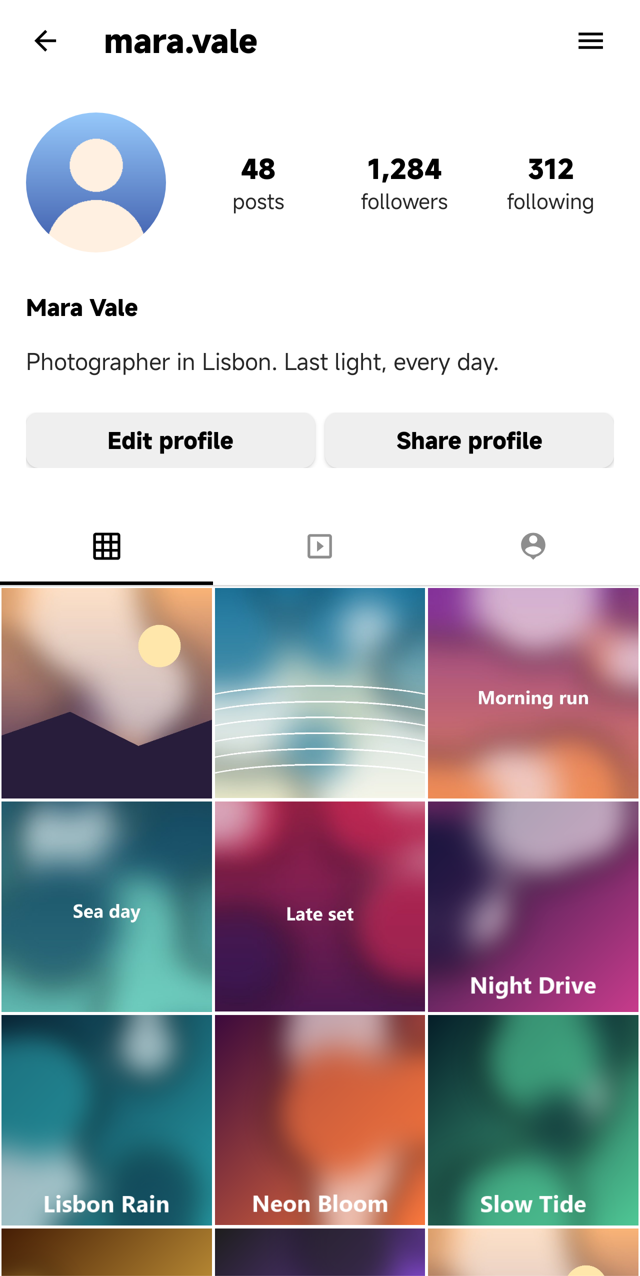
A tap on a tab slides to its page and so does a swipe; the line under the
strip follows the finger, and tabs.select(2) does it from code. The grid
under it is new too: height: auto on a virtual_collection makes it as tall
as its items, so the header goes up with the photos instead of the grid
scrolling in a window of its own. See
Tabs that swipe and
A grid of photos.
Charts
chart() draws bars, a line, a donut or a ring natively -- a Canvas on the
phone, the same shapes in the Previewer:
monthly = chart(SPENDING, kind="bar", id="monthly", on_click=show_month, screen=home)
chart(steps, kind="line", fill=True, id="steps", screen=home)
chart(CATEGORIES, kind="donut", center="$1,610", id="split", screen=home)
budget = chart(kind="ring", value=72, max=100, id="budget", screen=home)
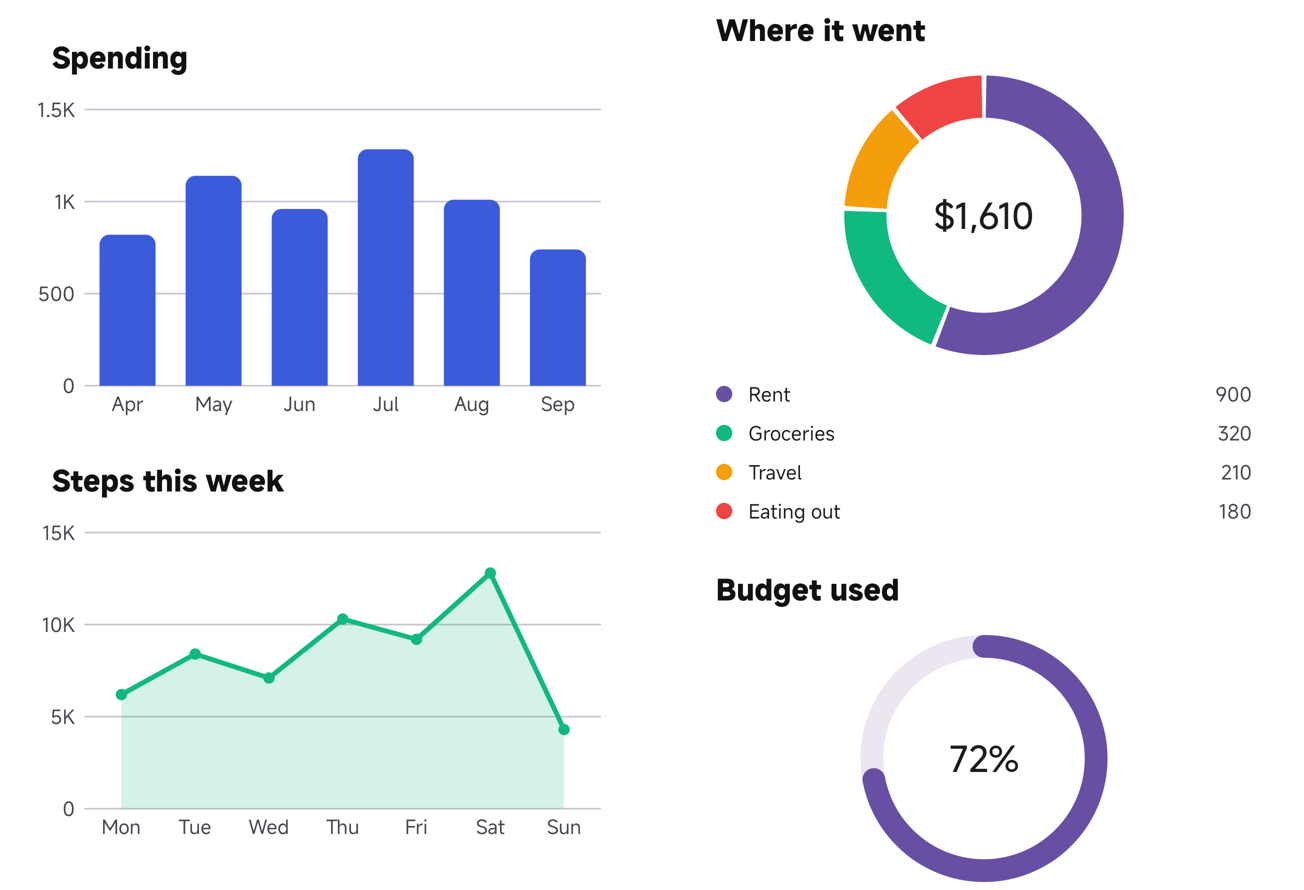
The axis ends on a round number, labels are thinned when they would not fit,
a donut lists its slices, and a tap on a bar, a point or a slice calls
on_click with its item. Rows from db.query() work as they come
(x="month", y="total"). set_items() redraws; set_value() moves a ring.
No chart library is added to the app. See Charts.
Rows that swipe and move
inbox = virtual_collection(
    MAIL, row=mail_row, id="inbox", screen=home,
    swipe_right=swipe("archive", "Archive", on_swipe=archive, undo="Conversation archived"),
    swipe_left=swipe("delete", "Delete", on_swipe=delete),
)
todo = virtual_collection(TASKS, row=task_row, id="todo", screen=tasks,
                          on_reorder=moved)
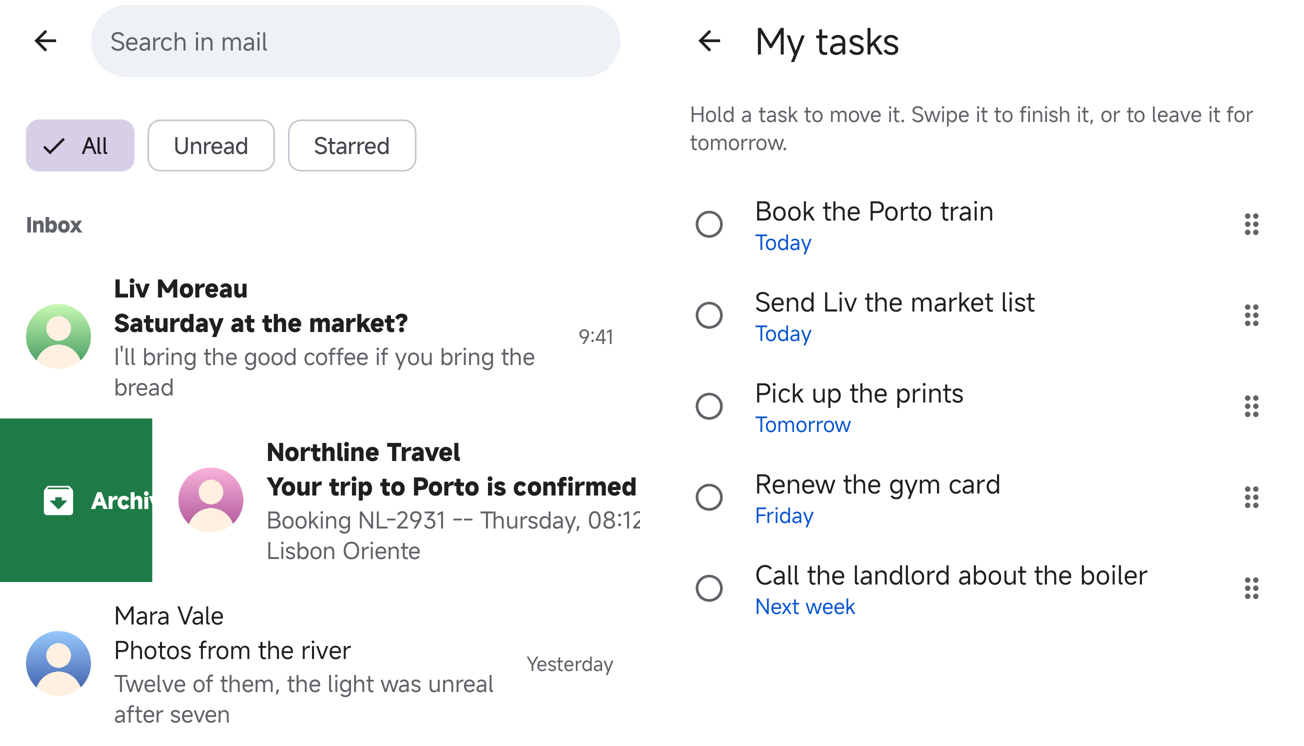
A swipe past 40% of the row takes it away and calls on_swipe(item). With
undo= a snackbar offers to bring it back, and your function only runs once
it has gone unpressed -- your code never has to put a row back. keep=True
slides the row back, for "mark as read". A long press lifts a row and a drop
calls on_reorder(item, index). Every gesture is also an accessibility
action on the row, so nobody has to perform it. See
Rows that swipe and move.
Chips and segmented buttons
Options that stay selected: the filters over an inbox, Day / Week / Month over a chart.
chips(["All", "Unread", "Starred"], selected="All", required=True,
      on_change=show, id="filters", screen=home)
chips(["Python", "Kotlin", "Java"], multiple=True, on_change=retag, screen=post)
period = segmented(["Day", "Week", "Month"], selected="Week",
                   on_change=show_period, screen=insights)
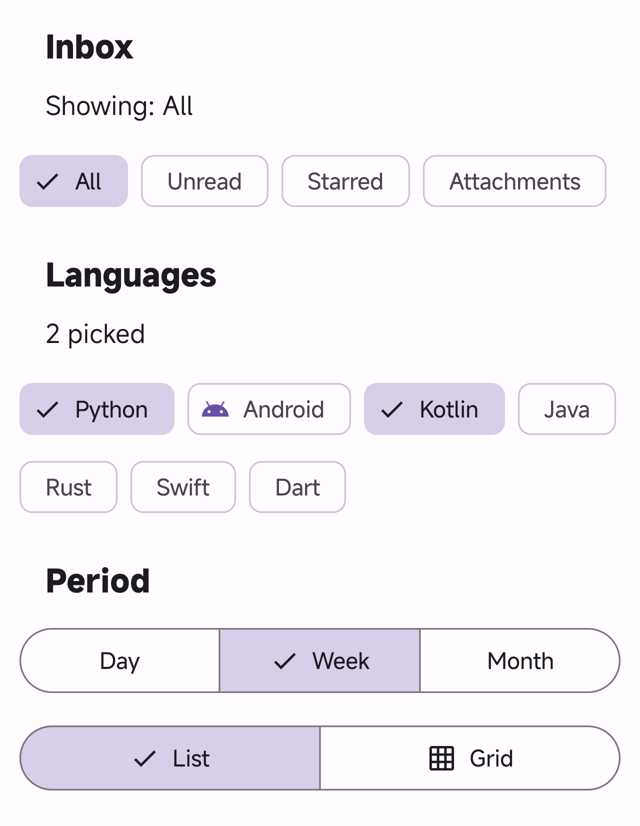
on_change gets the word, or with multiple=True the list, where
"Kotlin" in selected asks the list on the phone too. Each option is 48dp to
the finger, a screen reader reads it as a checkbox or a radio button with its
state, and the selection survives a rotation. See
Chips and segmented buttons.
Fields that say what is wrong
A sign-up form had nowhere to say what was wrong with a field. A text field now takes a line of help under it, can be required, and shows an error in its place:
name = inputs("Full name", id="name", required=True, screen=signup)
email = inputs("Email", id="email", help="We only use it to sign you in",
               required="Enter your email", screen=signup)

def create():
    if not validate(name, email):
        return
    if "@" not in email.get_value():
        email.set_error("That does not look like an email address")
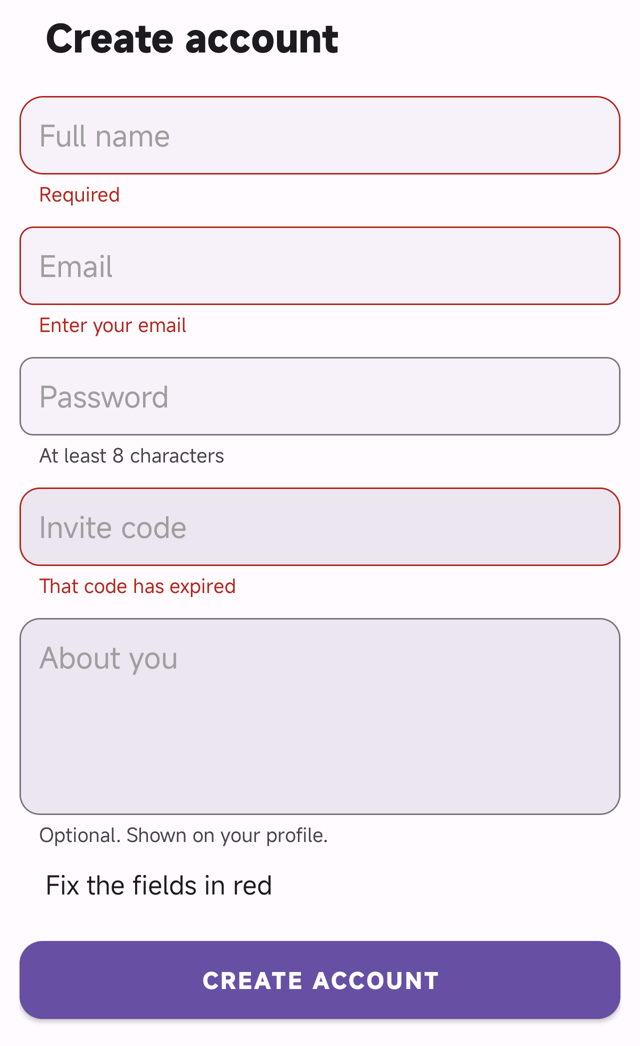
validate() shows every empty required field at once, puts the cursor in the
first and returns whether they passed; typing in a field clears its error.
See Fields with help and errors.
A bottom sheet that holds components
A sheet was a title, a line of text and a list of items. Give it the screen it opens over and it holds whatever a container holds:
filters = bottom_sheet("Filters", id="filters", screen=home)
order = segmented(["Newest", "Price", "Rating"], selected="Newest", parent=filters)
budget = inputs("Max price a night", id="budget", type="number", parent=filters)
button("Apply", command=apply, parent=filters)

button("Filters", icon="tune", command=filters.open, screen=home)
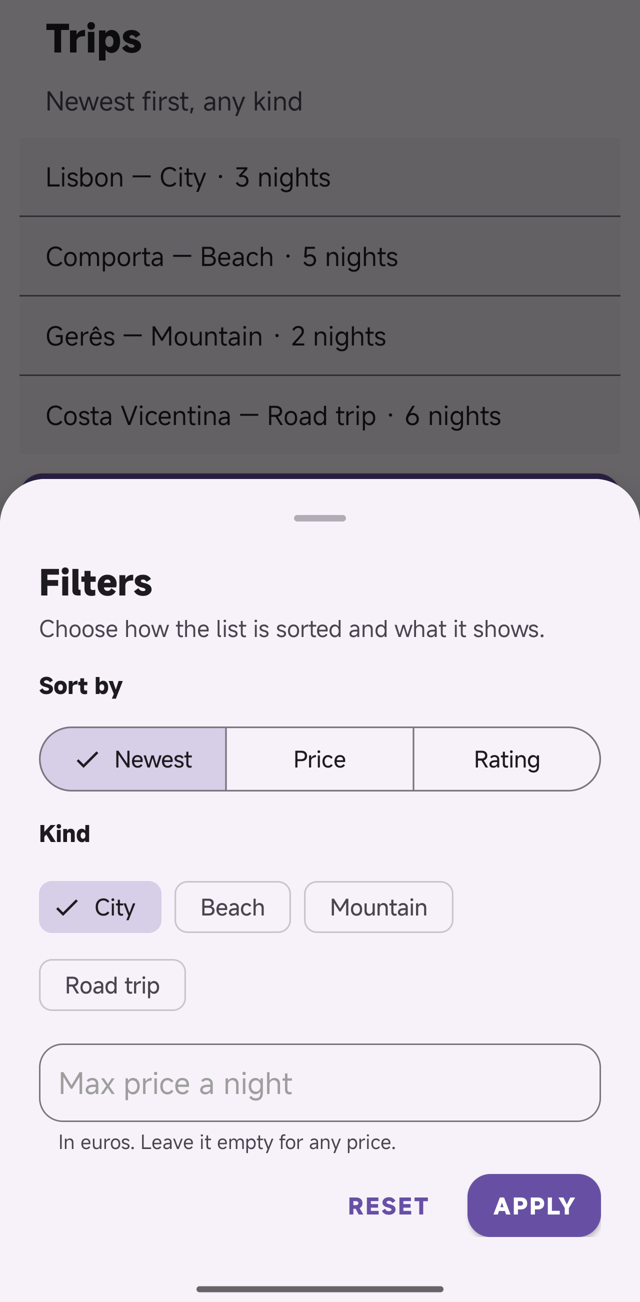
On the phone it is still Material's bottom sheet, so the drag, the scrim, Back
and the keyboard are the platform's. get_value() reaches its components
whether it is open or not. In the Previewer every sheet now has round
corners and a handle, and drags down to close. See
A sheet with components.
A picture that opens and zooms
image("harbour.jpg", id="hero", zoom=True, describe="A harbour at dusk", screen=home)

def open_photo(item):
    view_image(item["photo"])
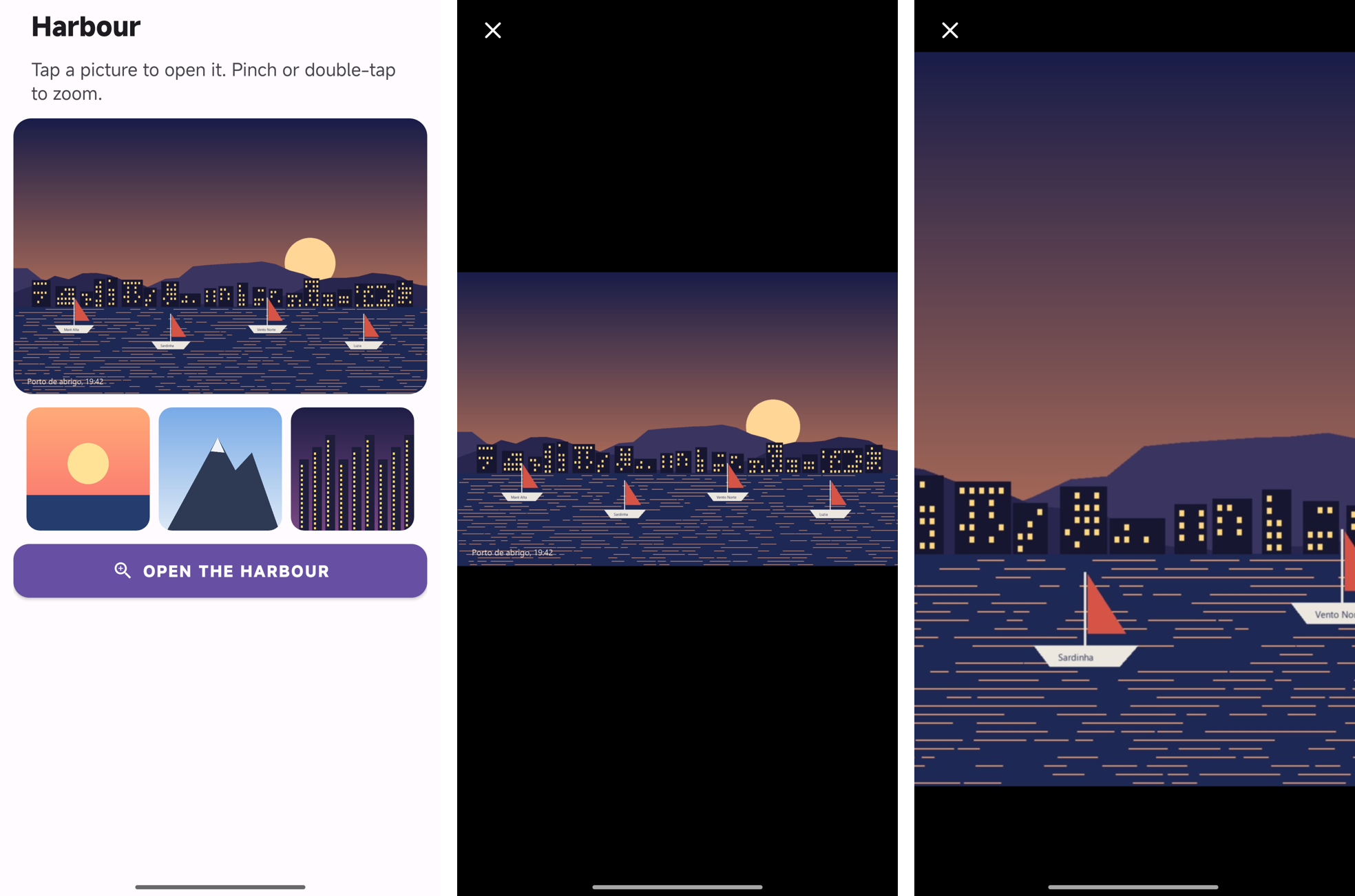
With zoom=True a tap opens the picture over the whole window: two fingers
zoom up to four times, a double tap zooms in on the spot and back, a drag
moves a zoomed picture, and Back, the cross or a drag down closes it.
view_image(src) opens any picture from a function. See
A picture that opens and zooms.
back()
A back arrow was written on_click_navigate(previous), which on the phone
starts a new copy of the previous screen on top -- the system's Back gesture
then walked through the copies. back() closes this screen and the one under
it comes back as it was:
See Go back.
A switch that tells you it moved
on_change was read for text fields only: a settings switch moved and
nothing heard it, on the phone or in the Previewer, and no error said so. A
switch, a checkbox and a slider call it now, with what get_value() gives.
The value a screen opens with -- a saved preference put back with
set_value() -- is not a change.
The showcase
Lumen's Insights tab is charts now: a ring for the month's plan, bars you can tap, a donut by category and a line. The rebuilt apps gained a profile with tabs and a photo grid, settings with a switch that remembers, an inbox whose rows swipe, and a task list that reorders. The four showcase APKs were rebuilt with 1.12.0. See the showcase.
Fixed
On the phone:
- On Android 15 and later, a plain screen -- no scroll, no bottom bar -- lost its padding: its content touched the edge of the glass.
- A
containerwith no background of its own painted the page's colour, a band across the card or sheet it sat on. It is transparent, as in the Previewer. - A column with
align-items: centercentred its children on the widest one, against the left edge. - Text that wrapped inside a flex container was centred; a photo cropped
with
object-fit: coverin a flex container drew outside its box. - A button with a small
heightcut the bottom off its words. for item in ITEMS:inside a function did not compile whenITEMSwas a list written at the top of the file.- A modal, sheet or menu could not be written below the function that opens
it (
U2033).
In the Previewer, where the phone was already right:
- A screen's
gapdid nothing, a screen with no padding was drawn with none at the sides, andpadding: 0pxkept 12px on top. A profile's grid began 32px higher than on the phone. - A grid of component rows spaced its cells 10px apart;
grid()covers were 150px squares. flex-growon a button in a row did nothing; an empty container with aheightwas 1px tall; a caption over a picture sat in the middle of its box; a switch had 16px more at each side.- A password field showed its hint as asterisks.
On both:
- A checkbox's
get_value()was the boolTruein the Previewer and the text"true"on the phone. It is"true"/"false"on both. - The accessibility report (
U2035) never looked inside a row built from components, and listed a button twice when one row function drew two lists.
Upgrading
- In the Previewer, a checkbox answers
"true"or"false", as it always did on the phone.if agree.get_value():was true only when ticked at the desk and always true on the phone; writeagree.get_value() == "true". on_changeon a switch, a checkbox or a slider is called now. If you passed one and it never ran, it runs.- Screens with a
gap, or with aTheme, are more spaced in the Previewer. It is what the phone always showed. - On the phone, a container without a background is transparent. On a plain page nothing changes; inside a card it stops drawing the page's colour.
- On the phone, a column with
align-items: centeris centred in its box, wrapped text starts at the start (text-alignstill moves it), and a button with aheightfrom the stylesheet centres its words in it. backis a name ApkPy knows. A function of your own calledbackstill wins.- A build can stop where it used to pass, each time naming the line: a
tab()outside apager()(U2040), an unknown chartkind(U2041), a swipe on a grid (U2042), chips with options that are not written out (U2043),help=on something that is not a text field (U2044), a component given to a sheet with noscreen=(U2045),zoom=Truetogether withcommand=(U2046). - Regenerate the Android project.
Seen on a phone, and not
Everything above was used on a Xiaomi running Android 16, driven through
adb and photographed: the pager, the four charts and a tap on a bar, the
swipes with Undo and the reorder, the chips, the form, the sheet with the
keyboard up, and the viewer.
Not seen: TalkBack reading the gestures, the fields and the sheet (the
actions and roles are there and were read with uiautomator, but nobody
listened to them); the form, the sheet and the viewer through a rotation; the
viewer's two-finger pinch, which shares its arithmetic with the double tap
that was seen; and a picture opened in the viewer from a URL.
The complete list is in the changelog.