Games: your first game
An ApkPy app can have a game: 2D, or 2.5D in the style of the DS-era RPGs. You describe the game in Python; the build turns it into data and Java, and the game runs inside your app, next to its normal screens (menus, shop, settings). The same engine runs on the phone and in the Previewer on your PC.
In this guide you make Balloon Pop: balloons rise, you tap them, five that get away end the game. It takes well under an hour. Every name used here is in the reference.
0. The one rule
game/main.py is read, never run, exactly like writehere.py. The build looks at what you wrote: declarations with plain values (Game(...), Entity(...), scene.add(...)) become data, and code inside Script classes is translated to Java. Nothing of your game runs in Python, and no Python goes into the APK. When you write something the build cannot read, it stops with a code, the line and how to fix it:
APKPY G1201  game/main.py:49
  'for' is not a declaration
  How to fix: Code that runs in the game goes in a Script class (...)
1. Make a project
You need ApkPy working (apkpy doctor), with its JDK and Android SDK.
apkpy doctor checks the JDK, the Android SDK and, in a project with a game, the game engine.
You get:
| File | What it is |
|---|---|
writehere.py |
The app: a start screen, a shop, a pause screen and a results screen. Its line enable_game() gives it the functions that talk to the game (game_play, game_resume, game_get...). |
game/main.py |
The game. |
assets/ |
Images and sounds (star.png, pop.wav, theme.wav). |
--game blank makes an app with a single screen. --game platformer (or shooter, runner, bricks, adventure, tap, puzzle, world) starts from a short game of that kind, and --game monster-rpg and --game tutorial from a whole one (section 14). apkpy game init adds a game to an app you already have.
2. See it running
This is the Previewer. Press Play: the game appears in the same window, where the phone's screen is. Click to tap. Alt+Left (or Escape) is the phone's Back button: it opens the app's pause screen, and Continue brings the game back exactly where it was. Save a file and the Previewer reloads; press Play again to see the change.
apkpy game play opens the game alone, in its own window.
A project can have its own steps run before every build, such as a tool that turns text into data. In apkpy.toml: [game] and before_build = ["tools/prepare.py"]. If a step fails, the build stops with what it said.
3. The game, the scene, an entity
Replace game/main.py with:
from apkpy_lib.game import *

game = Game("Balloon Pop", size=(360, 640), scale="fit", orientation="portrait", background="#10182b")

main = game.scene("main", start=True)
main.add(Entity("balloon", Shape(shape="circle", radius=22, color="#ff5c8a")), at=(180, 320))
sizeis the virtual screen: 360 x 640 units, whatever the phone.scale="fit"shows all of it (with bars if the phone's shape differs);"fill"crops,"expand"shows more world.- Positions are in those units: x to the right, y down, (0, 0) at the top left. Angles are in degrees.
- An entity is a name plus components.
Shape,SpriteandTextdraw; others move, collide or react. The reference lists them all.
Press Play in the Previewer: a pink balloon in the middle.
4. Make it move and pop
pop = assets.sound("assets/pop.wav")

main.add(Entity("balloon",
                Shape(shape="circle", radius=22, color="#ff5c8a"),
                Mover((0, -80)),
                OnTap(sound(pop), destroy())),
         at=(180, 600))
Mover((0, -80)) moves 80 units per second up. OnTap(...) runs actions in order when the entity is tapped: play a sound, then remove the entity. Actions are listed in the reference.
5. Many balloons: prefabs and spawners
A prefab is an entity you can make many of. It is a function that returns an Entity; its parameters become options:
@prefab
def balloon(color: str = "#ff5c8a"):
    return Entity("balloon",
                  Shape(shape="circle", radius=22, color=color),
                  Mover((0, -80)),
                  OnTap(sound(pop), destroy()),
                  children=[Entity("string", Shape(size=(2, 30), color="#c8d0e0"), at=(0, 36))])


main.add(Entity("red", Spawner(balloon(), every=0.9, jitter=0.3, area=(40, 680, 280, 0))))
main.add(Entity("blue", Spawner(balloon(color="#5cd6ff"), every=1.3, delay=0.5, area=(40, 680, 280, 0))))
A Spawner makes a copy every every seconds (give or take jitter) somewhere in area (x, y, width, height): here, a line just below the screen. Children move with their parent, so the string follows the balloon.
6. Score, rules and the end of the game
Games keep numbers in variables. Texts show them with {name}, actions change them, and rules watch them:
game = Game("Balloon Pop", size=(360, 640), scale="fit", orientation="portrait", background="#10182b",
            vars={"score": 0, "missed": 0})

# in the prefab:  OnTap(sound(pop), var_add("score", 1), store_add("coins", 1), destroy())

main = game.scene("main", start=True, on_back=open_app("pause_menu"),
                  rules=[when("missed >= 5", exit_game({"score": "{score}"}))])
main.add(Entity("score", Text("Score {score}   Missed {missed}/5", size=20, align="center")), at=(180, 50), ui=True)
ui=Truedraws the entity on the screen, not in the world (it does not move with a camera).when("missed >= 5", ...)runs its actions once, when the condition becomes true.only_if("keys >= 1", ...), among the actions of a tap, a collision or a timer, runs the actions after it only when its condition holds at that moment:OnCollide("player", only_if("keys >= 1", var_add("keys", -1), destroy()))is a door that needs a key. The condition is the same as a rule's: a variable, orcount(tag).deflect()on a ball, asOnCollide("paddle", deflect()), sends it away from the paddle turned by where it touched it: straight from the middle, up to 60 degrees at the ends (deflect(45)for less). Its speed stays. It is what lets the player aim in a brick breaker or a pong.exit_game({...})ends the game and hands the result to the app.store_add("coins", 1)adds to a value the app can read: the template's start and results screens showgame_get("coins"). That is how the game and the ApkPy screens share data.on_back=open_app("pause_menu")makes Back open the app'sScreen(id="pause_menu"); its Continue button callsgame_resume().
7. Your own logic: a Script
Something no component does (here: sway while rising, faster as the score grows, and count the balloons that get away) goes in a Script:
import math


class Balloon(Script):
    rise: float = 80.0
    sway: float = 14.0
    base_x: float = 0.0
    age: float = 0.0

    def on_start(self):
        self.base_x = self.x
        self.rise = self.rise + game.get("score") * 4

    def update(self, dt: float):
        self.age += dt
        self.y -= self.rise * dt
        self.x = self.base_x + math.sin(self.age * 3) * self.sway
        if self.y < -40:
            game.add("missed", 1)
            self.destroy()
Use it like a component (Balloon(), or Balloon(rise=120.0)) and drop the Mover. Scripts are a small, typed part of Python: annotate fields and parameters, and write conditions in full (if self.speed != 0: rather than if self.speed:). The build translates them to Java you can read in build/apkpygame/java/, and errors point at your Python line, at build time (G2xxx) and on the phone (G3100). What scripts can use is in the reference.
8. The whole game
"""Balloon Pop: the game of the games guide."""
from apkpy_lib.game import *
import math

game = Game("Balloon Pop", size=(360, 640), scale="fit", orientation="portrait", background="#10182b",
            vars={"score": 0, "missed": 0})

pop = assets.sound("assets/pop.wav")
theme = assets.music("assets/theme.wav")


class Balloon(Script):
    """Rises and sways; faster as the score grows. One that gets away counts as missed."""
    rise: float = 80.0
    sway: float = 14.0
    base_x: float = 0.0
    age: float = 0.0

    def on_start(self):
        self.base_x = self.x
        self.rise = self.rise + game.get("score") * 4

    def update(self, dt: float):
        self.age += dt
        self.y -= self.rise * dt
        self.x = self.base_x + math.sin(self.age * 3) * self.sway
        if self.y < -40:
            game.add("missed", 1)
            self.destroy()


@prefab
def balloon(color: str = "#ff5c8a"):
    return Entity("balloon",
                  Shape(shape="circle", radius=22, color=color),
                  OnTap(sound(pop), var_add("score", 1), store_add("coins", 1), destroy()),
                  Balloon(),
                  children=[Entity("string", Shape(size=(2, 30), color="#c8d0e0"), at=(0, 36))])


main = game.scene("main", start=True, music=theme, music_volume=0.4, on_back=open_app("pause_menu"),
                  rules=[when("missed >= 5", exit_game({"score": "{score}"}))])
main.add(Entity("red", Spawner(balloon(), every=0.9, jitter=0.3, area=(40, 680, 280, 0))))
main.add(Entity("blue", Spawner(balloon(color="#5cd6ff"), every=1.3, delay=0.5, area=(40, 680, 280, 0))))
main.add(Entity("score", Text("Score {score}   Missed {missed}/5", size=20, align="center")), at=(180, 50), ui=True)
9. On the phone
Plug in a phone with USB debugging on, then:
It builds the game with the app: enable_game() in writehere.py is what tells it there is one. The game opens full screen from the app's Play button; Back opens the pause screen. If Android closes the app while the pause screen is showing, Continue still brings the same game back: the engine saved what happened and plays it again, to the very same state.
For the Play Store (or a signed APK), the same as any app:
apkpy game build builds only the game, when you want to read the Java its scripts became (build/apkpygame/java/).
10. 2.5D: the DS look
A scene can be drawn in perspective, like the DS-era RPGs: a ground of tiles with heights, boxes for houses, and people as sprites standing up and turned to the camera. The game itself stays 2D: positions are on the ground (x, y), plus an elevation. Physics, rules, scripts and replays work as before; only the drawing and the taps go through a 3D camera.
village = assets.tilemap("assets/village.tmj")
hero_sheet = assets.sheet("assets/hero.png", frame=(16, 24))     # rows: down, left, up, right; columns: walking

town = game.scene("town", start=True, kind="2.5d",
                  camera={"follow": "hero", "pitch": 50, "distance": 270, "fov": 40, "fog": (260, 520), "bounds": "map"})
town.add(Entity("map", Tilemap(village)))
town.add(Entity("hero", Billboard(hero_sheet, directions=4), GridController(tile=16)), at=(152, 312))
town.add(Entity("house", Block((48, 32), 30, top=roof, side=wall)), at=(72, 72))
town.add(Entity("tree", Plane(tree_img, size=(28, 44), cross=True)), at=(24, 24))
- Camera:
pitchis how far it looks down (degrees),distancehow far it stands from the point it follows,fovits field of view,yawits turn around the vertical axis;fogfades the distance into the background colour.bounds: "map"keeps the view on the map. Billboard(sheet, directions=4): a sprite on its feet, turned to the camera. Its row follows where it faces (by itself when it walks); its columns are the walking frames. It climbs the map's heights by itself.GridController: walks one cell at a time with the arrows, TouchButton keys, or a tap on a cell. A short press in a new direction only turns.Block,Plane: a box (an image or a colour on the top and on the sides), and a single quad: standing,flaton the ground, orcrossfor trees.- Heights: in Tiled, give a tile (or a layer) a
heightproperty, in tiles. The map's cells rise, and walls appear by themselves where a cell is higher than its neighbour (side: the tile used on those walls). Mark cliffs as solid so walkers go round by the stairs. - Scripts:
self.elevation,self.billboard.facing,self.grid.walking,scene.camera_yaw(turn the camera in a cutscene). - On the phone, 2.5D needs OpenGL ES (the default,
Game(renderer="auto")). On the PC it is drawn in software, inside the Previewer as usual.
The complete example is examples/games/mossbrook in ApkPy's repository ("Lanterns of Mossbrook": find three lanterns, talk to the villagers through an ApkPy screen).
11. A bigger game: many files, data classes and state
A game with a lot of rules does not fit in one file. Every .py file under game/ is a module: import from it like in any Python project, always with the whole path from game.
game/
  main.py                 # the declarations: Game, scenes, entities (as before)
  data/monster.py         # @dataclass classes
  rules/damage.py         # plain functions: the rules
  state/store.py          # the state that lives across scenes
  world/hero.py           # Script classes
# game/data/monster.py
from dataclasses import dataclass, field


@dataclass
class Monster:
    species: str
    level: int
    hp: int = 10
    moves: list[str] = field(default_factory=list)

    def is_fainted(self) -> bool:
        return self.hp <= 0
# game/state/store.py
from dataclasses import dataclass, field
from game.data.monster import Monster


@dataclass
class Store:
    team: list[Monster] = field(default_factory=list)
    flags: dict[str, int] = field(default_factory=dict)


STATE = Store()
# game/world/hero.py
from apkpy_lib.game import *
from game.data.monster import Monster
from game.state.store import STATE
import game.rules.damage as rules


class Hero(Script):
    def on_start(self):
        STATE.team.append(Monster("ember", 5))
- Imports:
from game.x.y import name, otherorimport game.x.y as y. A cycle (a imports b, b imports a) is an error that names it (G1219): move what both need into a third module. - What a module holds: imports, constants (
LIMIT = 4), module state, plain functions,@dataclassclasses andScriptclasses. The declarations (Game, scenes, entities,@prefab) stay inmain.py, which imports the scripts it puts on entities. @dataclass: typed fields (the ones without a default first, as in Python), methods,Monster("ember", 5)or with namesMonster(species="ember", level=5),==that compares the fields,str()like Python's, andreplace(m, hp=10)(fromdataclasses) for a changed copy. Lists and dicts start withfield(default_factory=list). Class names are game-wide (they become Java classes).- Module state: a name given a list, a dict or a data class at the top of a module (
STATE = Store()) is the game's state across scenes. Change what it holds (STATE.team.append(...)), do not replace it. It starts over with each new game, comes back with a suspended game, and is part of the state hash the parity check compares. None: afterif m is None: return(or insideif m is not None:),mis known to hold a value;x is None or x.hp > 0works too.- Plain functions can use
random(the game's seeded one) andmath, but notgame,sceneorinput: they get values, which keeps the rules testable. The same module runs in CPython, so you can test the rules with pytest before the game exists. On Python 3.8, a module that runs there and writeslist[...]ordict[...]in a@dataclassneedsfrom __future__ import annotationsas its first line (3.9 and newer do not); the build reads it either way. - The Previewer (
python writehere.py) reloads when you save any file undergame/, however deep.
Data tables
Content that grows (species, moves, items) is data, not code. A table is a @dataclass with an id: str, and JSON files:
# game/data/defs.py
from __future__ import annotations          # lets Species point at itself (Ref[Species])

from apkpy_lib.game import *
from dataclasses import dataclass, field
from typing import Optional


@dataclass
class Move:
    id: str
    power: int


@dataclass
class Species:
    id: str
    name: str
    base_hp: int
    moves: list[Ref[Move]] = field(default_factory=list)
    evolves: Optional[Ref[Species]] = None


MOVES = table("data/moves", Move)          # data/moves.json: [ {"id": "spark", "power": 40}, ... ]
SPECIES = table("data/species", Species)   # data/species/*.json: one species per file
- The build checks every row against the class: types, missing fields (unless they have a default), unknown fields (with a "did you mean"), repeated ids, and every
Ref[...]against the table it points to. The error names the file and the place in it:data/species/ember.json: moves: "splsh" is not in data/moves. - In code:
SPECIES.get("ember"),SPECIES.has(id),SPECIES.all(),len(SPECIES),for s in SPECIES,"ember" in SPECIES. AReffield holds the id:MOVES.get(s.moves[0]).power. Rows are shared: read them, do not change them. - A folder of files (
data/species/*.json, read by file name) keeps one thing per file: adding a species is adding a file.
JSON and saves
# game/state/store.py: the module state holds the save, so a loaded save can take its place
@dataclass
class Session:
    save: Store = field(default_factory=Store)


SESSION = Session()
text = to_json(SESSION.save)                  # the same text in CPython and on the phone
saves.write("slot1", text)                    # in a Script: atomic, never half written
text = saves.read("slot1")                    # None when the slot is empty; also saves.exists / saves.delete
if text is not None:
    SESSION.save = from_json(text, Store)     # unknown keys are ignored, missing ones take the default
Module state itself is never replaced (SESSION = ... is refused), only what it holds. Because missing keys take the field's default, adding a field to Store (with a default) keeps old saves loading. Keep a version: int field for the changes a default cannot cover. A save that was read is part of the journal: a game brought back after the phone closed the app plays with the text it read, even if the slot changed since.
What the map says
- A Tiled object's custom properties come with the entity made from it:
self.props.get_str("event"),get_int,get_float,get_bool(each with an optional default) andhas. - A tile's custom properties (in the tileset) are read with
scene.tile_tag(x, y, "zone"): the top-most layer with a tile that has it, hidden layers included (a hidden "zones" layer is a good place for them);""where none has.
The rules can be tested with pytest before the game exists: the modules are plain Python, table() reads the same files, and to_json writes the same text.
12. Fonts, text and pixel art
body = assets.font("fonts/body.ttf")          # TTF or OTF
pixel = assets.font("fonts/pixel.fnt")        # a bitmap font: BMFont text format, one page, its .png in the project

game = Game("My game", size=(270, 480), scale="expand", pixel_scale=True, font=body)

box = game.scene("main")
box.add(Entity("line", Text("Won [c=#ffd84a]50 coins[/c]!\nWell done.", size=14, max_width=240, max_lines=3)), at=(15, 30))
box.add(Entity("title", Text("HELLO", font=pixel, size=24)), at=(15, 200))
font: perText, or for all of them inGame(font=...). Without one, the system's font. Changing the game's font is one line.- Line breaks:
max_widthbreaks at spaces (a word wider than the line is cut),\nalways breaks. The breaks come from the font's measures, taken at build time, so they are the same on the PC and on every phone. With the system font the measures are only approximate: real text boxes should use a font of the game. - Colours inside the text:
[c=#rrggbb]...[/c]. - Pages and letter by letter, for dialogue boxes:
class Dialogue(Script):
    def on_start(self):
        self.text.visible_chars = 0

    def update(self, dt: float):
        t = self.text
        if t.visible_chars < t.page_chars:
            t.visible_chars += 1
        elif input.pointer_pressed() and t.page + 1 < t.pages:
            t.page += 1
            t.visible_chars = 0
Scripts also have t.lines, t.width, t.line_height, t.size, t.max_width and t.measure("some text").
- Bitmap fonts are drawn as sprites, at a whole number of screen pixels per texel, on whole screen pixels: they never blur. Sizes that are multiples of the font's own size look best.
- TTF fonts are drawn at the screen's real resolution, sharp over a pixel-art world.
- pixel_scale=True: a virtual pixel is a whole number of screen pixels. With scale="expand", what is left of the screen shows more of the world; with fit, it becomes bars. Use filter="nearest" on sprites (Tilemap, Billboard and Block already do). The Previewer frames it as a 1080p phone does: the whole number is counted in that phone's pixels, so the window shows the same world as the phone, whatever its size.
Pixels that change: Canvas
A Canvas is a picture the game paints while it runs: a drawing game, a map that shows where you walked, a trail, a floor to paint.
from game.page import Page

draw = game.scene("main")
draw.add(Entity("page", Canvas(320, 400, color="#fbf7ee", brush="#1d1f27", brush_size=3), Page()), at=(180, 270))
- The size is in pixels, and one pixel is one unit of the world: scale the entity to draw it bigger. Each pixel stays a sharp square (
filter="linear"blurs them). color=fills it at the start.image=starts from a picture (a PNG, not interlaced), andframe=from one frame of a sheet; withoutwidthandheight, the canvas takes the picture's size.brush=lets the player paint with a finger or the mouse. A stroke starts on the canvas and leaves a line with no gaps,brush_sizepixels wide. On the interface (ui=True), a canvas with a brush keeps the finger from what is under it.- Scripts paint with
self.canvas:set(x, y, "#ff0000"),get(x, y)(""outside),fill(color),clear(),rect(x, y, w, h, color),line(x1, y1, x2, y2, color),circle(x, y, radius, color),flood(x, y, color)(a paint bucket: the area of one colour, joined by its sides),count(color),stamp(image, x, y)(anassets.image(...)of the game, laid over what is there) andset_brush(color)(""stops it).pointer_xandpointer_yare the pixel under the finger (-1 off the canvas);changedsays the brush painted in the last step. - Colours are
"#rrggbb"or"#aarrggbb". Anything else is aValueError, with the line. - The same everywhere: the engine reads the PNG itself and mixes colours with whole numbers, so a replay leaves the same pixels on the PC and on the phone, and they count in the state hash.
examples/games/sketch is a whole drawing game: six colours, two brushes, a paint bucket, stickers and a button to clear the page.
13. The game's interface
Menus, life bars and buttons can all be made inside the game. They are entities with ui=True: drawn in screen units, always over the world, outside the camera. (In the file, or imported, the script classes come before the declarations that use them.)
box = assets.image("assets/box.png")     # cut in nine: the corners keep their size

@prefab
def pause_menu():
    return Entity("menu", Panel(box, size=(200, 120), border=8, modal=True), PauseMenu(), ui=True, children=[
        Entity("go", Button("Continue", size=(150, 36), image=box), Close(), ui=True, at=(0, 20)),
    ])

s.add(Entity("life", Bar(100, max=100, size=(150, 10)), ui=True, anchor="top"), at=(15, 22))
s.add(Entity("open", Button("Menu", size=(120, 40), pivot=(1, 1), image=box), OpenMenu(menu=pause_menu()),
             ui=True, anchor="bottom-right"), at=(262, 472))
class OpenMenu(Script):
    menu: Prefab

    def update(self, dt: float):
        if self.button.clicked:
            scene.pause("world")                # the world stops, the interface goes on
            scene.spawn(self.menu, 135, 200)


class PauseMenu(Script):
    def on_back(self) -> bool:                  # the phone's Back: True when dealt with
        scene.resume("world")
        self.entity.destroy()
        return True
Panel: an image cut in nine, or, while there is no art, a colour with a line (Panel(size=(200, 120))).modal=True: nothing below it can be tapped.Button: a click is a finger going down and coming up on it.Button("OK", var_add("x", 1), sound=click)runs actions; scripts readself.button.clicked,.enabled,.label, and.textfor the label'sText.Bar: setself.bar.valueand it glides there (speed, in fractions ofmaxper second).self.bar.shownandself.bar.movinglet a script wait for it. It changes colour undermid_atandlow_at.- Taps: each finger belongs to the top-most interface entity that takes it (highest
layer, thenorder, then the last added), and the world does not see it. A script that handles taps on the world asksif input.pointer_pressed() and not input.pointer_on_ui():. - Pausing: every entity is in a group:
"ui"for interface entities,"world"for the rest, orgroup="..."of your own. A paused group stops but is still drawn. - Back: goes to
on_backfrom the last entity added to the first, until one returnsTrue. Otherwise the scene'son_back=actions apply, as before. anchor: design for yourGame(size=...). On a longer screen,anchor="bottom-right"moves the entity with that corner of the real screen. Values:top-left(default),top,top-right,left,center,right,bottom-left,bottom,bottom-right.game.view_widthandgame.view_heightgive the visible size.- More in scripts:
self.shape.width,self.shape.set_color("#ff0000"),self.sprite.set_tint(...),self.sprite.set_frame(3),self.sprite.set_image("assets/monsters/moth.png")(also on aBillboard; the file must be in the game:assets.folder("assets/monsters")takes every image of a folder),self.text.set_color(...).
Lists, tabs, toggles, sliders, a keyboard
class Bag(Script):
    def on_row(self, row: Entity, index: int):          # called when a row shows another item
        item = STATE.items[index]
        row.child("name").text.text = item.name
        row.child("count").text.text = "x" + str(item.count)

    def update(self, dt: float):
        if self.list.tapped >= 0:
            use(self.list.tapped)


@prefab
def bag_row():
    return Entity("row", Panel(box, size=(230, 36)), children=[
        Entity("name", Text("", size=13), at=(-105, 5)),
        Entity("count", Text("", size=13, align="right"), at=(105, 5)),
    ])


s.add(Entity("bag", ScrollList(bag_row(), count=500, size=(250, 340), item_size=(250, 36), gap=4), Bag(), ui=True), at=(10, 95))
ScrollList: only the rows that fit exist, used again as it scrolls, so 500 items cost the same as 10. Each row is an entity at the centre of its cell, cut at the list's box.columns=5makes a grid. Scripts:self.list.count(set it when the data grows or shrinks),.refresh()(the data changed),.tapped(the index tapped in this step, or -1),.scroll,.max_scroll,.scroll_to(index). AButtonin a row takes its own taps; a drag that starts on it scrolls and is not a click.row.child("name")finds an entity below the row.Tabs(["Items", "Keys"], size=(240, 28)):self.tabs.selected,self.tabs.changed. Show and hide your pages by settingactive.Toggle("Sound", value=True):self.toggle.value,.changed.Slider(40, max=100, step=5):self.slider.value,.changed.Keyboard(max_length=12, size=(260, 170)): letters are capital until the first one is typed.self.keyboard.text,.changed,.done(its OK key).rows=["ABCDEFG", ...]for your own letters, accents included.
Replays can drag too: STEP:drag:X1:Y1:X2:Y2:STEPS, next to STEP:tap:X:Y and STEP:KEY:down.
Changing scene
game.goto("route_1", "from_town", 0.4) # the scene, where to arrive, seconds of fade (both optional)
As an action: goto_scene("route_1", at="from_town", fade=0.4).
- Entities with the tag
"arrives"appear at the entity or Tiled object of that name. Name the object in Tiled;game.arrivaltells a script which one it was. - During the fade to black nothing moves; the new scene runs while the picture comes back.
Entity(..., persistent=True)goes along to the next scene without starting again: music, a text box. If the next scene declares a persistent one of the same name, the one arriving takes its place, so going back and forth never makes two. It cannot have aBodyor aCollider.
14. Starting from a whole game
A kind of game is a faster start than an empty file:
Each of these makes a whole short game, with its art and its sounds, and an app around it: a title, a pause and a results screen, the best score, in English and Portuguese.
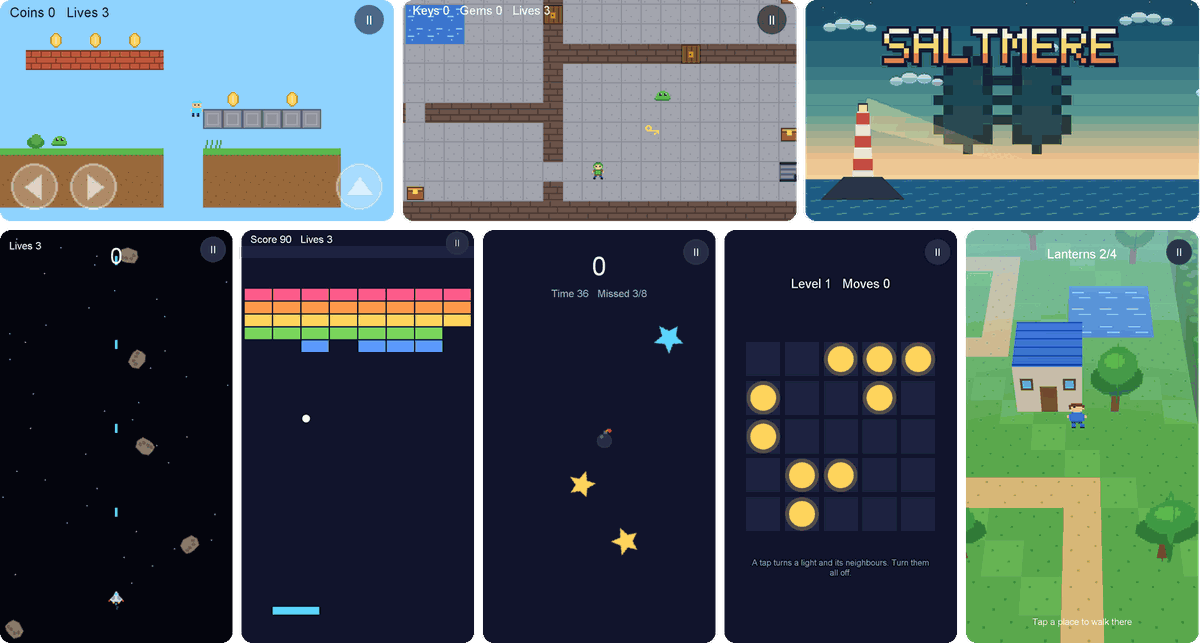
Pictured by the engine on a PC, the same engine the phone runs.
--game |
The game it makes | What it is made of |
|---|---|---|
platformer |
Hop Hills: run, jump, coins, slimes and a flag. Two levels | PlatformerController, a Tilemap with a solid layer, Patrol, OnCollide(..., side="top"), a camera that follows |
shooter |
Star Guard: a ship that fires by itself, rocks that fall, a second wave with saucers | TopDownController(axis="x"), Timer, Spawner, Mover, Emitter, rules that change scene |
runner |
Rooftop Run: it never stops. A hop over the crates, a high jump for the coins, and birds up there | A PlatformerController that stays where it is, TouchButton, each Spawner sending things with a Mover |
bricks |
Brickfall: a paddle that aims the ball, and two levels of bricks | Body(bounce=1), solid Colliders, deflect(), bricks placed as a level's objects, when("count(brick) == 0", ...) |
adventure |
Keys of the Keep: rooms seen from above, keys, doors, chests, slimes and stairs. Two floors | TopDownController, walls on a solid layer, only_if("keys >= 1", ...) on a door |
tap |
Quick Pop: tap the stars before they go, and not the bombs. 40 seconds | OnTap, Spawner(area=...), Lifetime with actions, a Timer as the clock |
puzzle |
Lights Off: a tap turns a light and its neighbours. Five boards | A Script of about 70 lines: taps, a grid, levels as text |
world |
Gem Valley: a 2.5D valley to walk, with houses, trees and four lanterns to find | kind="2.5d", GridController, Billboard, Block, Plane, a level with a raised tile |
All but the puzzle are made of components only, so the Studio (section 15) changes every part of them. The puzzle is the one to read when your game needs rules of its own. Each has a README.md that says what to change where, with ideas to go on. Their levels are .tmj files, to paint in the Studio or in Tiled.
Two more are larger:
This makes a project with the opening of a monster-catching RPG, made only with what this guide covers: maps from text files or Tiled, events as data, monsters and moves as data, battles in 2.5D, capture, levels and evolution, a shop, a bag, a team, an encyclopedia, options, saves, and a bot that plays it all. All of its art, sound and story are placeholders to replace. Its README.md has a recipe for each thing you will want to add: a monster, a move, a map, an event, a trainer. apkpy game studio, inside it, opens the Studio with the RPG's own sections, to make all of that without code.
This one is the smallest game there is: a red square that follows your finger, in one file. Its tutorial/ folder explains it step by step, from installing to changing it.
15. The Studio
The Studio is one window to make your game. In your project's folder:
In a folder with no project, the same command opens on A new game: choose the kind from its picture (the kinds of section 14), give it a name, and the Studio opens on it. New game..., at the bottom of the side bar, makes another one beside the game you are in.
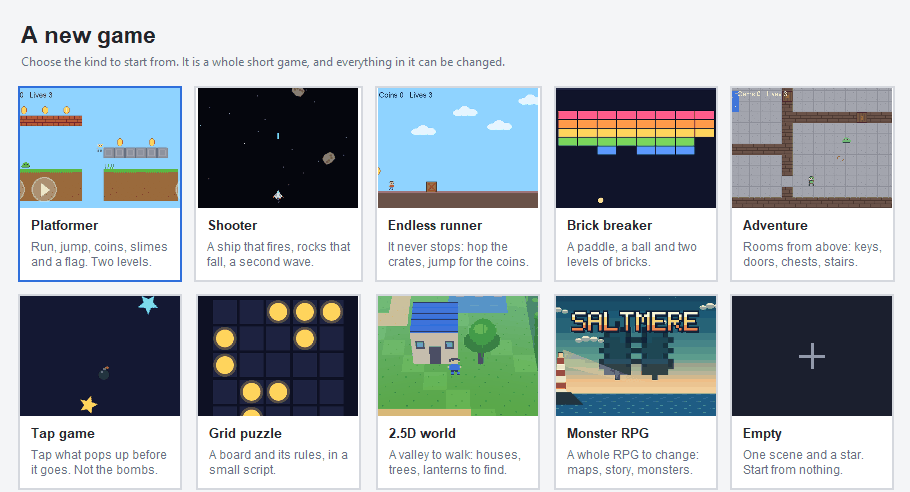
- Play: the game inside the window, the same engine as on the phone, from its first scene or any other.
- My game: the name under the icon, the app id, the version and the icon; then
Game(...): the size, orientation, scaling, background, and the variables. - Objects: each
@prefab. Its components are cards with their settings (the ones in use first, "All settings" for the rest); add one from a menu, or one of yourScriptclasses, whose typed fields become settings. AnAnimatorshows each animation playing, from the frames of the sheet. - Scenes: each
game.scene(...): its settings, its camera, its rules (when(...)with their actions), and what is added to it: objects, texts on the screen, shapes, a level. - Levels: the
.tmjmaps, the files Tiled makes. Paint tiles on a layer, mark a layer solid, place objects (each shows as its picture), make a new level with a starter set of tiles, change its size. - Sounds: listen to the game's sounds, bring one in, or make one: a jump, a coin, a laser, an explosion... or a short tune for a mood. "Another one" makes a different one of the same kind.
- Your data tables: one section for each
table(...)of your game, with a form made from its@dataclass. The comment at the end of a field's line is its help in the form. "Where it is used" and "Rename everywhere" follow everyRef[...]. - Art: every picture of
assets/, drawn pixel by pixel or imported. A picture your code cuts withassets.sheet(..., frame=(16, 16))shows its frames, and its preview plays them. - Publish: a test version, a signed version, a file for the Play Store, and your phone.
- Copies: a copy of the project is made when the Studio opens, before the first save and before anything big; go back to one at any time.
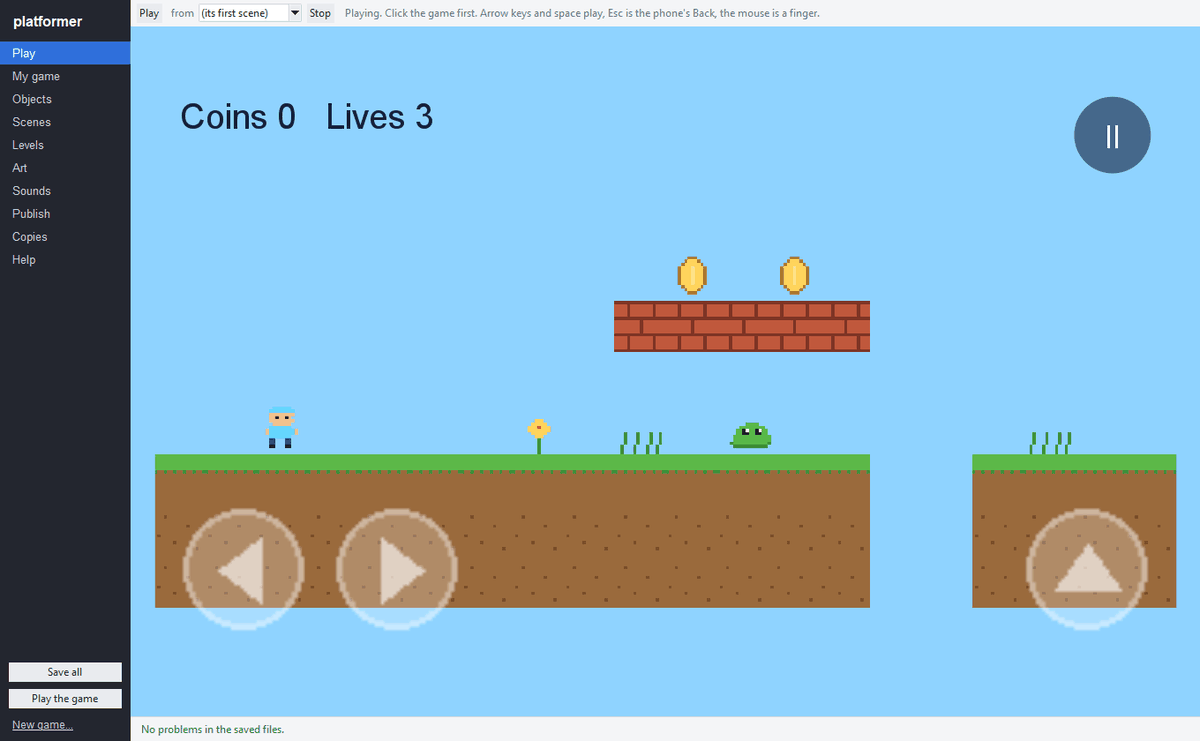
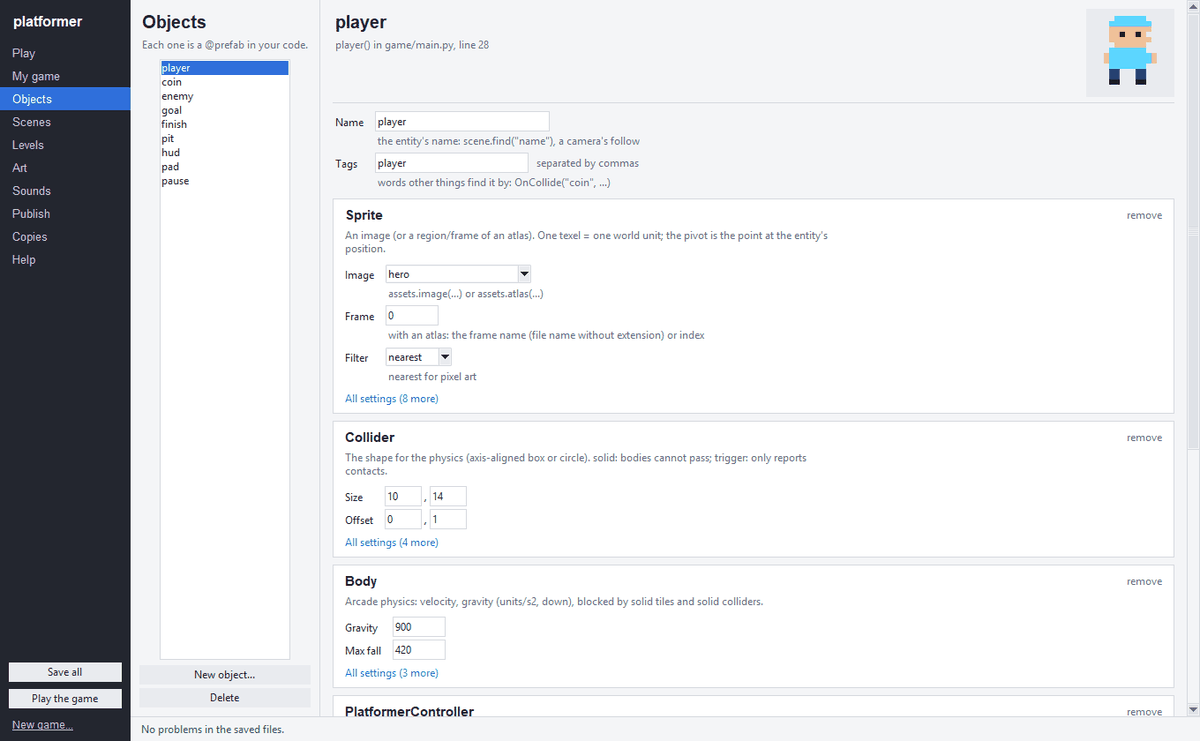
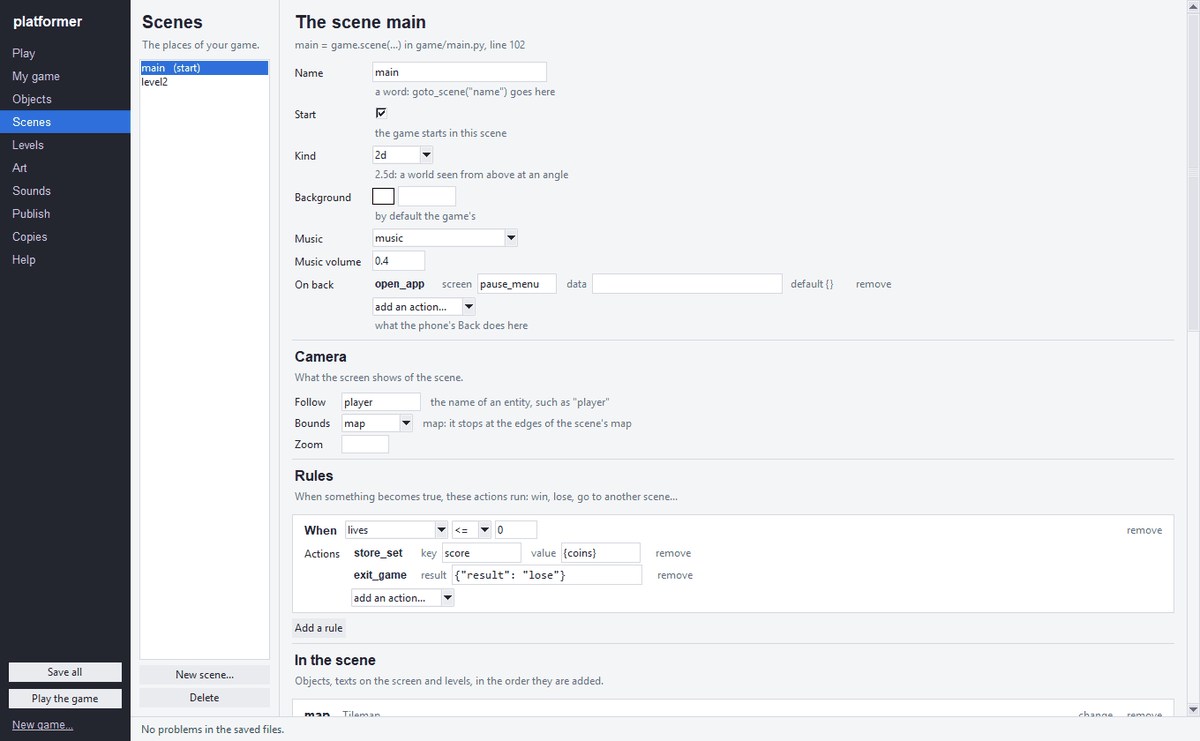
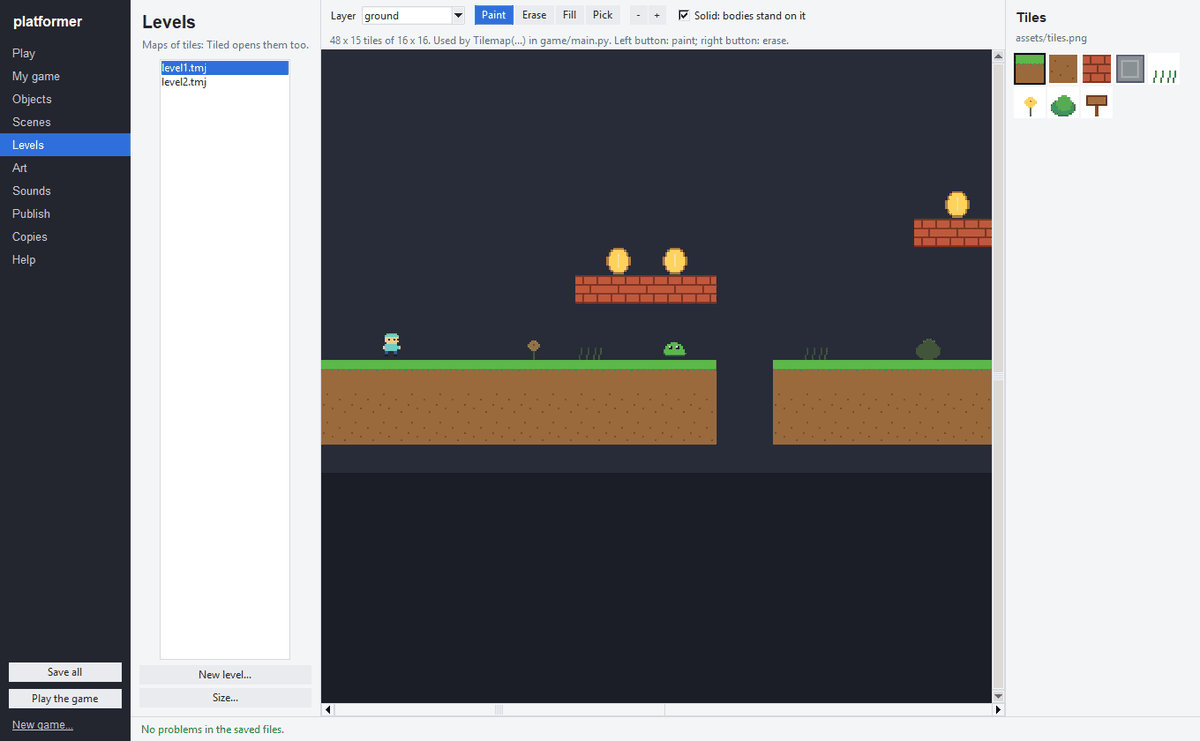
The line at the bottom says what the build says about the saved files; click a problem to go where it is.
The Studio writes your game's Python, as you would: a change rewrites only the value or the line that changed, and
the rest of the file (your comments, your spacing, your Script code) stays as it was. A value it cannot show as a
setting (a name, a sum) shows as the Python it is. When the file changes on disk while the Studio is open, it reads it
again; it never writes over a change of yours without asking.
A project can add sections of its own: tools/studio_kit.py defines Studio, a subclass of
apkpy_lib.game.studio.shell.Shell. The monster-rpg template's maps, story, monsters, moves and tests are one.
16. Where next
- Sprites and sound:
assets.image("assets/x.png")withSprite(img);assets.sheet(...)withAnimatorfor animations;assets.sound/assets.music. - Physics:
Collider,Body(gravity, bounce),OnCollide("tag", ...),PlatformerController,TopDownController,Patrol,Follow. - Levels:
Tilemap(assets.tilemap("levels/one.tmj"))reads maps made in Tiled. - Text in two languages:
Text(t("key"))uses thetranslations({...})ofwritehere.py. - Examples in
examples/games/of ApkPy's repository:sunbeam(a puzzle, scripts),shipsandplatformer(components only),scripted(the ships game with scripts),menus(the app around a game),sketch(aCanvasto paint on).